Best Practices for Farm Client Data Storage
If your farm data lives in paper folders, phones, and spreadsheets, mistakes will follow. I’d boil this article down to five habits: keep one master client record, use the same naming rules every time, limit who can edit or view records, back data up on a set schedule, and test restores before you need them.
Here’s the short version:
- I’d store each client, field, job, spray record, and invoice in one connected system
- I’d use fixed formats like MM/DD/YYYY, full legal business names, and standard field labels
- I’d limit access by role, with MFA and device locks on phones, tablets, and laptops
- I’d keep pesticide application records for at least 2 years under federal law, with some states asking for more detail
- I’d back up high-priority records daily and test recovery at least once a year
- I’d archive old records by policy instead of letting inactive files pile up
A few numbers stand out. Federal pesticide record rules can require 2 years of retention. Acreage checks should stay within about 5% of GPS field mapping boundaries. And for many farm teams, an RPO of 24 hours or less means daily backups are the bare minimum.
What matters most is simple: one source of truth, clean data entry, tight access, and backups that you’ve already tested.
How to build a farm client database that stays organized
A farm client database usually doesn’t fall apart all at once. It slips little by little. One name gets entered two ways. A field gets logged under the wrong client. An invoice sits apart from the job it came from. After a while, small errors stack up.
The fix is simple in concept: build everything around one master client record, use the same entry rules every time, and clean things up on a set schedule.
Keep one master client record linked to fields, jobs, and equipment history
The master client record should be the center of the system. It stores the client’s legal business name, any DBA names, main contact details, billing terms, and mailing address. Then you link fields, jobs, invoices, and equipment costs back to that one record.
| Record Type | What It Stores | Why It's Linked |
|---|---|---|
| Master client record | Legal name, DBA, contact info, billing terms | Central hub for all related records |
| Field record | GPS boundary, acreage, soil notes | Ties agronomic history to a specific location |
| Job/work order | Date, service type, operator, equipment, materials | Links billable work to client and field |
| Application record | Product, rate per acre, gallons applied, weather conditions | Supports compliance reporting and audits |
| Invoice record | Line items referencing job IDs, quantities, rates | Prevents duplicate billing and reconciles payments |
| Equipment cost record | Hours, fuel per job, maintenance events | Tracks cost control and job history per client and field |
This setup keeps billing, service history, and audit records tied together. If a client calls with a billing issue, you can open one record and see every job, field, and invoice in one place. If you need records for a spray audit, you can filter applications on one field across a date range without digging through separate folders or spreadsheets.
That one source of truth is what makes the system usable when the season gets busy.
Once the structure is set, the next step is making sure people enter data the same way every time.
Set data entry standards for names, dates, units, and field labels
A master record is only as good as the data inside it. Without entry rules, one client can end up stored as Smith Farms LLC, Smith Farm, and J. Smith - three records for the same customer.
That’s why a short data dictionary matters. It gives every employee the same playbook.
For U.S. farm operations, the rules should cover the entries people use most often. Individual client names should follow Last Name, First Name such as Smith, John. Business names should use the full legal entity name, such as Smith Family Farms LLC. Field names should follow one pattern, like [Farm identifier] – [Cardinal direction or local name]. So you’d use North Farm – West 40, not NF West or West Field North.
Dates should always use MM/DD/YYYY, and times should use the 12-hour clock with AM/PM. Acreage should be rounded to the nearest tenth. Measurements should stay in U.S. units: acres for area, miles for distance, gallons for volume, and °F for temperature. Crop names and service labels should come from a controlled list, such as Corn (grain), Soybeans, and Pre-emerge spraying, instead of free-text entries. That makes filtering and reporting much less messy.
| Data Category | Standard Format | Example |
|---|---|---|
| Client name (individual) | Last Name, First Name | Smith, John |
| Client name (entity) | Full legal name | Smith Family Farms LLC |
| Field name | [Farm ID] – [Direction/Name] | North Farm – West 40 |
| Date | MM/DD/YYYY | 04/15/2026 |
| Phone | (XXX) XXX-XXXX | (515) 555-0192 |
| Area | Acres to one decimal | 145.8 acres |
| Temperature | °F | 72°F |
If everyone follows the same format, the database stays clean enough to sort, search, and trust.
Schedule routine data cleanup to prevent duplicates and stale records
Even with solid entry rules, records still drift over time. A client stops farming. A parcel changes hands. Someone types a name a little differently in a rush. It happens.
A quarterly review during slower parts of the year helps keep those problems from piling up between seasons.
During each review, one assigned person - often a data steward - should check for duplicate client names and overlapping field boundaries. They should also confirm that acreage matches mapped polygons within a 5% threshold and flag inactive clients for archiving.
When duplicates need to be merged, use a careful process:
- Back up the database first
- Keep the most complete record as the master
- Move any one-off data from the duplicate into the master
- Archive duplicates instead of deleting them, so you can roll back if a merge goes wrong
This part only works if someone owns it. If cleanup belongs to “everyone,” it usually belongs to no one, and it gets skipped as soon as work picks up.
After cleanup, restrict who can edit the records.
Transform Your Agricultural Team
Streamline job management, field mapping, and machine tracking with HarvestYield. Simplify your operations and eliminate paper job sheets.
ContinueHow to secure client records and control access
After cleanup, the next step is to lock down who can view and edit records. Cleanup only sticks when access is under control. The goal is simple: protect records without making day-to-day work a pain.
Limit access by role and use strong authentication
A good starting point is to give each person access to only what their job needs. This is role-based access control (RBAC): set up roles first, then attach permissions to the role instead of the person.
For a typical farm operation, it usually looks like this:
| Role | What They Need Access To | What Should be Restricted |
|---|---|---|
| Owner / Manager | All records, pricing, contracts, financials, tax files | Nothing |
| Office Staff | Contact details, invoicing, scheduling, job history | Internal margin data, full contract terms |
| Applicators / Operators | Client name, field maps, job notes, prescriptions | Pricing, tax records, full financial history |
| Mechanics | Machine IDs, service history, job assignments | Client PII, pricing, invoicing |
| Seasonal Workers | Assigned job details, field locations | All client PII, pricing, contracts |
That setup keeps people from seeing data they don't need. A mechanic doesn't need billing records. A seasonal worker doesn't need contract details. It's common sense, but it only works if you set the rules in advance.
Use unique 12-character passwords and MFA for any system that stores client, pricing, or financial data. Shared logins - one farm account that everyone uses - cause all kinds of trouble. You can't tell who changed what, and if one set of credentials gets compromised, the whole system is exposed. MFA adds a second check, which matters even more when devices are used in trucks, shops, and the field. An authenticator app is often a good fit for crews because it still helps protect access if a phone or laptop goes missing.
Review access at least once a year, and do it right away when someone leaves or moves into a new role. Seasonal workers who are no longer active should not still have access to client records.
Protect data on phones, tablets, laptops, and field connections
This part gets overlooked all the time. Phones get left in trucks. Tablets get passed between shifts. Laptops go home at night.
Every device that touches client data should have automatic screen lock turned on with a short timeout. Use built-in device encryption, along with a PIN or biometric unlock. If a device is lost, remote wipe lets you erase it before the data goes with it.
Connections matter too. Unsecured Wi-Fi at a co-op, truck stop, or café can expose login credentials if staff sign in to farm systems over unencrypted connections. The fix isn't complicated: require secure, HTTPS-based platforms and avoid sensitive systems on public networks unless a VPN is in place.
Emailed spreadsheets with client lists or pricing are another weak spot. Once a file is sent, it can be forwarded, copied, or saved somewhere you don't control. A better setup is to keep data in one secure platform so staff open records through an app instead of passing around static files. That cuts down a lot of risk.
These controls matter most when people move between the office, the field, and shared devices.
Collect only the data you need and document consent and usage
Every extra field on a client form creates risk if you don't have a clear reason to keep it. Data minimization means collecting only what you need to deliver services, invoice correctly, and meet legal obligations.
For most farm service businesses, that usually means:
- Business name
- Contact person
- Addresses
- Phone
- Preferred communication method
- Field locations
- Required regulatory numbers
Collect Social Security Numbers or bank account details only when required, and store them separately.
A simple way to review your forms is to ask: Do we use this, require it by law, or need it to do the job? If the answer is no, remove the field.
Consent matters too. Clients should know what you're collecting and why, which is often outlined in a Privacy Policy. A short, plain-language notice in your service agreement can cover the basics: how contact details are used for scheduling and billing, who inside the business can see them, and how long records are kept. Document when consent was given. Keep required consent records, including disclosure language, date, time, source, and revocations.
Strong access control protects records while people are using them; backup and recovery protect them when devices fail or accounts get locked out.
How to set up backup, retention, and recovery for client records
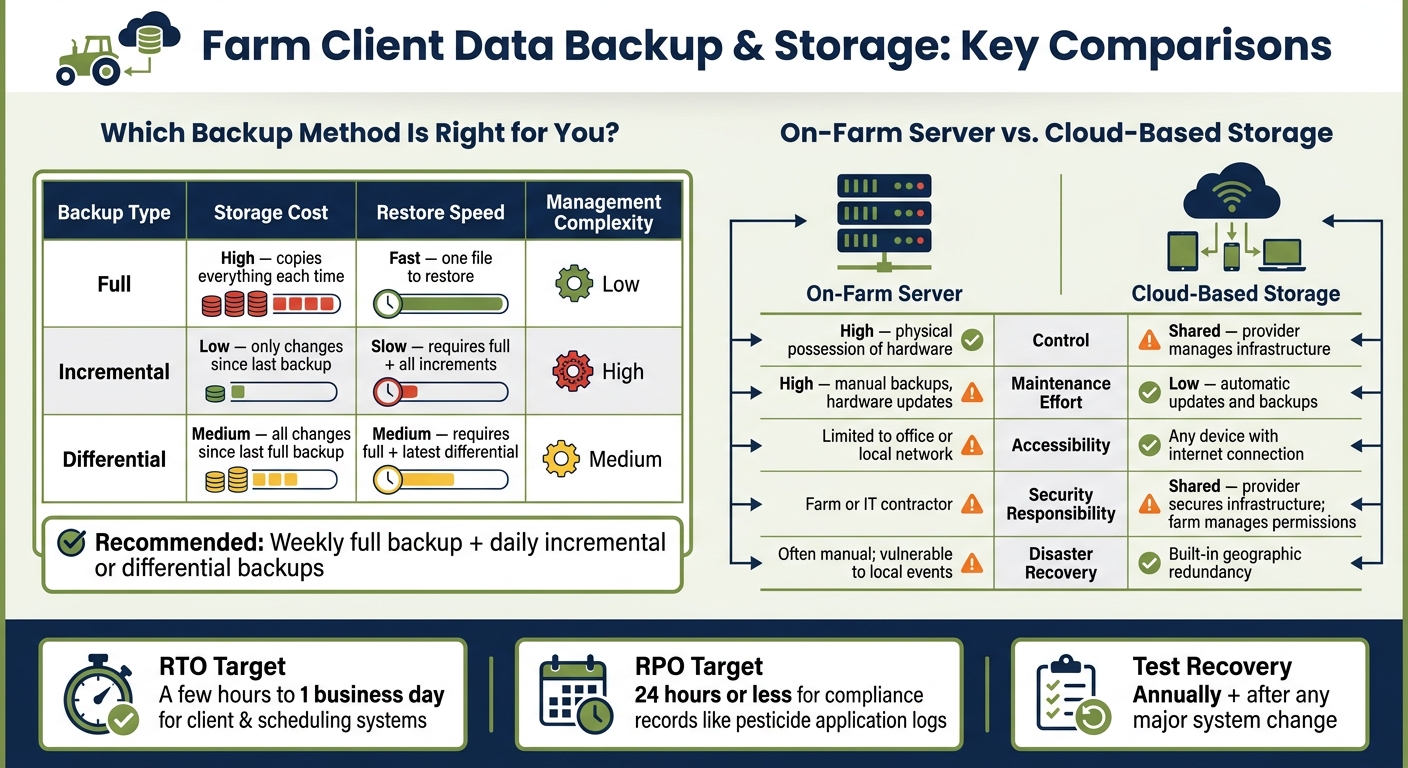
Farm Client Data Storage: Backup Types & Storage Options Compared
Once access is locked down, backups are the next line of defense. They keep records available when someone deletes a file, a hard drive dies, ransomware hits, or severe weather knocks systems offline. That matters in a farm operation. Crews still need job details in the field, and office staff still need to bill.
Choose storage and backup methods based on risk, cost, and restore speed
A simple way to handle backups is to sort records by priority.
- Tier 1: client contact details, field boundaries, active job schedules, and current invoices - back up daily
- Tier 2: historical job records, machine-cost histories, and older financials - back up weekly
- Tier 3: photos, scanned forms, and older reports - back up weekly or monthly, depending on storage cost
Each backup type comes with a trade-off. Some cost more to store. Some take longer to restore. Some need more hands-on work.
| Backup Type | Storage Cost | Restore Speed | Management Complexity |
|---|---|---|---|
| Full | High (copies everything each time) | Fast (one file to restore) | Low |
| Incremental | Low (only changes since last backup) | Slow (requires full + all increments) | High |
| Differential | Medium (all changes since last full) | Medium (requires full + latest differential) | Medium |
For many farm operations, a weekly full backup with daily incremental or differential backups is a solid setup. It keeps storage costs under control without leaving you stuck redoing too much work after a failure.
Storage location matters just as much as backup frequency. An on-farm server gives you direct control, but it also keeps maintenance and disaster risk in one place. Cloud storage shifts maintenance to the provider and makes records easier to reach from field devices.
| On-Farm Server | Cloud-Based Storage | |
|---|---|---|
| Control | High - physical possession of hardware | Shared - provider manages infrastructure |
| Maintenance Effort | High - manual backups, hardware updates | Low - automatic updates and backups |
| Accessibility | Limited to office or local network | Any device with an internet connection |
| Security Responsibility | Farm or IT contractor | Shared - provider secures infrastructure; farm manages permissions |
| Disaster Recovery | Often manual; vulnerable to local events | Built-in geographic redundancy |
CISA's ransomware recovery guidance recommends restoring from offline, encrypted backups in priority order. In plain terms, bring back the records that keep the business moving first: scheduling, client files, and invoices.
Set retention rules for client, financial, and field-service records
Retention rules should separate active records from records kept for compliance. Write separate rules for active client files, closed jobs, invoices, equipment logs, and regulatory records. If you keep everything forever, things get messy fast. Audits get harder, searches take longer, and old records pile up.
For most U.S. farm operations, these timeframes are a practical starting point. Client profiles should stay active while the relationship is active, then remain on file for 5–7 years after the last job. Completed job sheets and service records should usually stay on hand for at least 3–7 years, based on state pesticide and environmental recordkeeping rules. Invoices and financial records often follow IRS guidance, with 7 years being a common benchmark. Machine-cost logs should stay for the life of the equipment, plus a few extra years to support depreciation schedules and replacement planning. Regulatory and application records can have set minimums; USDA rules for certain covered commodities require records to be kept for at least 1 year and produced within 5 business days if requested.
Use backups for recovery. Use archives for retention. When records are no longer part of day-to-day work, move them to lower-cost archival storage instead of deleting them right away. Also document the basics: when records move to archive, when they can be deleted, who has authority to approve deletion, and how that deletion is logged.
Test your recovery steps so the team can restore records quickly
A backup is only useful if your team can actually restore it under pressure. Test restores by recovering sample client, field, and job records into a separate environment. Then measure how long it takes against your RTO.
Recovery Time Objective (RTO) is the amount of time you can afford to be without client and job data before work starts to stall. Recovery Point Objective (RPO) is how much recent data loss you can live with. For many farm operations, a workable RTO for client and scheduling systems is a few hours to one business day. For compliance-heavy records like pesticide application logs, an RPO of 24 hours or less is a sensible target. That means daily backups at a minimum.
Don’t stop at the technical restore. Have office staff check that they can pull up client files, review job history, and generate invoices. Have field staff confirm they can open job schedules and field details from a phone or tablet. NIST guidance also stresses picking the correct backup version free of malicious code before restoration. That step matters a lot after ransomware. Restore the wrong backup, and you're back where you started.
Run these tests annually, and run them again after any major change to backup tools or data systems. Review backup logs on a regular basis too. Failed jobs and skipped files are much easier to fix before the middle of a busy workweek.
Use a centralized system to manage farm client data day to day
Storage rules only help if your team makes day-to-day updates in one place. If client contacts sit in a spreadsheet, field notes stay on paper, and job details get entered again in a separate invoicing tool, things start to slip. Records go missing. Billing slows down. And when you need to pull everything together later, the job gets a lot more painful.
Use HarvestYield to keep client, field, and job records connected
HarvestYield keeps client, field, and job records in one cloud system. Each client record links fields, job history, GPS data, and weather conditions, so billing and service details stay in the same place. That means fewer handoff issues and less back-and-forth when someone needs the full picture. Once that structure is in place, use the same naming and retention rules inside HarvestYield.
Align your HarvestYield setup with your data standards and retention policy
Set up HarvestYield around your naming, date, unit, and retention rules from day one. Make key fields required, and use drop-down lists so new entries follow the same format every time. It’s a simple move, but it cuts down on messy data fast.
Spell out who owns each part of the record:
- Office staff manage client profiles
- Operations managers update field boundaries
- Operators enter job details
- Managers approve archiving or deletion
Use required fields, drop-downs, and permissions inside HarvestYield to keep the policy in place every day, not just on paper.
Conclusion: Keep farm client data accurate, secure, and easy to recover
Good farm client data storage comes down to five habits: standardize what you collect, keep it in one master record, limit access, back it up, and store it in one system. Put those habits together, and your team gets a setup it can trust for organization, security, and recovery.
Scattered records lead to mistakes and slow down billing. One master client record, with standardized names, MM/DD/YYYY dates, and consistent field labels, makes data easier to search and use. Role-based access also keeps things clean: office staff handle financials, operators log job details, and no one sees more than they need.
Backups are only useful if you can restore them fast. That’s why it helps to test recovery a few times each year. Keep local storage for fast restores, and keep an offsite copy for disaster recovery.
That same discipline works best in a centralized platform. HarvestYield keeps client records, field boundaries, and job data connected in one place. The key is using it every day, not just setting it up well.
The best storage system is the one your team uses consistently in the field and office.
FAQs
How do I choose a single source of truth for client records?
Move from scattered notebooks, texts, and spreadsheets to one cloud-based system. Keep contact details, field boundaries, job history, and billing records inside a single client profile so the whole team works from the same current information.
Focus on mobile access, searchable records, and automatic syncing. That cuts down on data silos and manual entry mistakes. HarvestYield helps by storing client details, field maps, and job records in one secure place.
What data should farm teams avoid collecting or storing?
Farm teams should keep data that helps with day-to-day work, accurate billing, and strong client relationships. If a record doesn’t help your crew do the job, back up an invoice, or track customer history, it probably doesn’t need to stay.
That means skipping redundant, outdated, or unverified data. Extra clutter can slow people down and make reporting messier than it needs to be.
Instead, focus on data your team can act on, like GPS boundaries, service history, and communication logs. This is the kind of information that helps crews schedule jobs, explain invoices, and improve profit through HarvestYield.
How often should I test backups and restore records?
Test backups and restore records monthly so your agricultural records stay intact.
If you use HarvestYield, automatic cloud backups add protection. But it’s smart to make a monthly export of records like CSV or PDF files to a local computer, external drive, or second cloud service too. That gives you one more layer of safety.
During each review, make sure exports run as expected, records open on different devices, and search pulls up historical data correctly.