Best Practices for Real-Time Team Communication on Farms
If farm updates don’t reach the right people within minutes, work slows down and safety risk goes up. On U.S. farms, the fix is simple: use set channels, clear naming rules, short daily huddles, reply-back rules, and digital job record that ties every update to a field, crew, and machine.
I’d boil the article down to this:
- Map how messages move now for 2–3 days
- Use one main channel per message type
- Set one naming system for fields, jobs, and machines
- Run a 10–15 minute morning huddle
- Require confirmations for urgent and routine updates
- Log updates to the job record with status like Start, Pause, and Complete
- Review 5 monthly metrics to cut delays, duplicate work, and safety issues
The article also makes one point that’s hard to ignore: agriculture had a fatal injury rate of 18.6 per 100,000 full-time workers in 2022, versus 3.7 per 100,000 across all industries. So better communication is not just about saving time. It helps stop avoidable mistakes when weather shifts, machines fail, or crews move between fields.
A few parts matter most in day-to-day farm work:
- Harvest timing: field plans, truck timing, grain moisture, and elevator hours can change fast
- Breakdowns: crews need to report machine ID, location, and delay right away
- Weather: wind, storms, and heat can change the day’s plan in minutes
- Spraying and livestock areas: people need clear notices about where to stay out and for how long
- Rural coverage gaps: any setup should work with weak cell service and offline sync
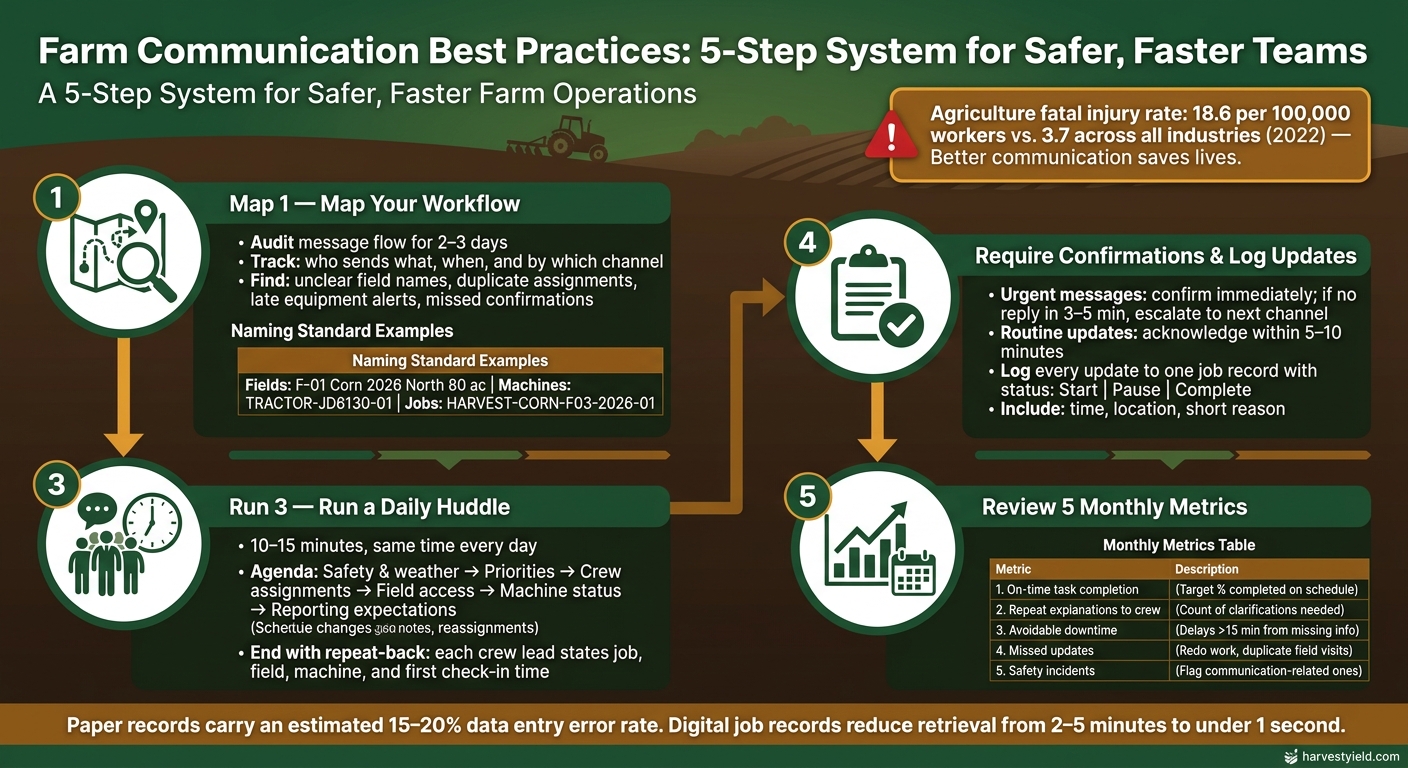
Farm Communication Best Practices: 5-Step System for Safer, Faster Teams
Quick Comparison
| Part of the process | What to do | What it helps prevent |
|---|---|---|
| Workflow check | Track messages for 2–3 days | Hidden delays and missed handoffs |
| Channel rules | Use calls/radios for urgent issues, written messages for routine updates | Confusion about where to send what |
| Naming rules | Standardize field, machine, and job names | Wrong-field trips and duplicate assignments |
| Daily huddle | Meet for 10–15 minutes before work | Missing priorities, hazards, and access details |
| Confirmations | Require “Received” or repeat-back | Messages sent but not heard |
| Job record logging | Tie updates to one field and one job | Lost details in text threads or paper notes |
| Monthly review | Track 5 simple metrics | Repeat problems that drain time and money |
What I like about this article is that it stays practical. It doesn’t tell farm managers to add more tools. It shows how to improve real-time communication to be more clear, more consistent, and easier to track.
Transform Your Agricultural Team
Streamline job management, field mapping, and machine tracking with HarvestYield. Simplify your operations and eliminate paper job sheets.
Continue1. Map Your Current Communication Workflow
Once the need for fast updates is obvious, the next step is simple: map how information moves on your farm right now.
Take 2 to 3 days and track how messages travel across the operation. Ask each person on the team - the farm manager, crew leaders, equipment operators, and office staff - to log one full workday. They should note what they sent, who received it, when they sent it, and which channel they used. After a couple of days, you’ll have enough to see the pattern clearly.
List who sends what, when, and by which channel
Sort the audit by shift stage so repeated message types stand out.
| Time Block | Who Sends It | Message Type | Typical Channel |
|---|---|---|---|
| Before the shift | Farm manager → crew leaders | Field assignments, priorities, hazards | In-person huddle + text follow-up |
| During the shift | Operators → crew leaders | Machine status, fuel, job progress | Radio or phone call |
| During the shift | Crew leaders → manager | Headcount, field changes, issues | Text or phone |
| End of day | Crew leaders → office | Completed acres, materials used, unresolved issues | Phone or paper sheet |
The goal is to make the flow visible, consistent, and recorded. Most U.S. farms already have the devices they need to do this. The weak spot usually isn’t hardware. It’s the process.
Find breakdowns that cause lost time or safety risk
Once you map the flow, the trouble spots tend to show up fast.
One of the biggest is unclear field names. If one person says "the east field" and another says "Field 4" for the same parcel, an operator can lose 30–60 minutes driving to the wrong place. That means extra fuel burned and less time for jobs that can’t wait, like spraying or harvesting.
Another common issue is duplicate assignments. A verbal change gets passed to one crew but not the other, and suddenly two teams are doing the same job while a higher-priority field sits untouched. It’s the kind of mix-up that feels small in the moment and expensive by the end of the day.
Late equipment alerts are another pattern. An operator notices a minor issue but doesn’t mention it right away. By the time the manager hears about it, the parts store is closed, the mechanic is booked, and the machine is out for the day.
The problem many farms miss is no reply confirming receipt. If a crew leader radios a weather alert or a field change and no one has to answer back, you don’t know who heard it and who didn’t. That’s a serious gap when chemical application zones, heat stress conditions, or equipment movement near other workers are involved.
Use the workflow map to fix the highest-risk issues first.
That map shows which channels need clear rules next.
2. Choose the Right Communication Channels and Set Clear Rules
Once you know where communication breaks down, the answer isn't adding more tools. It's giving each channel one clear job.
Map your message types, then assign one primary channel to each one. That way, people don't have to guess: Should I text this? Call? Put it in the app? The rule is already set.
Use voice for urgent issues and messaging for routine updates
Use voice for injuries, breakdowns, and weather that changes fast. In those moments, speed matters more than anything else.
Use written messages for routine updates that can wait, like:
- a schedule change
- a locked gate note
- digital job instructions
- a crew reassignment
Written messages help because people can re-read them, forward them, and search them later. That makes it easier to confirm details and cut down on mix-ups.
Set naming standards for fields, jobs, and machines
Clear labels keep texts, calls, and job records lined up. Create one master naming list and give it to every employee during onboarding.
This matters more than it might seem at first. Standard IDs help stop the same problems shown in your workflow map: wrong fields, duplicate assignments, and missed alerts.
Use names like F-01 Corn 2026 North 80 ac for fields, TRACTOR-JD6130-01 for machines, and HARVEST-CORN-F03-2026-01 for jobs. Every work message should include who, where, what, and when.
Comparison table: channels by speed, records, and cost
Each channel has its place. The table below makes it easier to match the message to the right tool.
| Channel | Immediacy | Record Retention | Cost | Best For |
|---|---|---|---|---|
| Voice Calls | High | Limited unless logged elsewhere | Low | Injuries, equipment failures, severe weather |
| Two-Way Radios | High | None | Moderate | Field coordination, areas with no cell signal |
| Mobile Messaging | Medium | Searchable history | Low | Schedule changes, field notes, job instructions |
| HarvestYield | Medium | Permanent, GPS-linked | Higher | Job records, scheduling, mobile job sheets, cost tracking |
Once the channel rules are set, put that same information into the job record. HarvestYield keeps the official record in one place: field maps, GPS tracks, weather, machine use, and client details. That means crews can use texts or radios for fast updates without losing the paper trail.
3. Build Daily Protocols the Team Can Follow
Once your channels and naming rules are in place, turn them into a daily routine the crew can use without guessing.
Good farm communication shouldn't depend on memory. Put it in writing, make it repeatable, and keep it simple enough that new hires or multilingual workers can follow it without a lot of back-and-forth.
Run a 10–15 minute daily huddle before work starts
Hold the huddle at the same time every day and keep it to 10–15 minutes. Stick to the same agenda each time: safety and weather first, then the day's top priorities, crew assignments by name, field locations and access routes, machine availability and limits, and reporting expectations.
Then end with a quick repeat-back. Each crew lead says their job, field, machine, and first check-in time out loud before anyone heads out.
That fixed routine helps a lot when the foreman changes or a seasonal worker is brand new. On hot days, use the huddle to go over heat-illness steps, cool-down breaks, and who calls 911 if someone shows signs of serious heat illness. Without a set agenda, those details are easy to miss.
Require message confirmation and escalation steps
After the huddle, the same rules should stay in place when plans change fast.
Not every message needs the same response. Urgent issues should be confirmed right away. Routine updates need a short acknowledgment within 5–10 minutes. On the radio, the receiver should repeat back the key details. For text or app messages, a reply like "Received" is enough. If an urgent message isn't confirmed within 3–5 minutes, send it again through another channel and notify the next supervisor.
Write out escalation steps for situations that can't wait. For injuries or medical emergencies, stop work and call 911 if the situation is life-threatening. Then notify the on-site supervisor with the location, time, and the worker's condition. For spray issues like drift, misapplication, or changing wind, the operator should stop and send the manager the field ID, product name, time, and the problem they saw. For machine breakdowns, the operator reports the machine ID, location, and estimated delay so the manager can reassign equipment or adjust truck timing.
Protocol table: clear messages vs. vague messages
Use examples to train crews. A good message answers who, what, where, and when.
| Scenario | Clear Message | Vague Message |
|---|---|---|
| Starting harvest | "8:05 AM – Started harvesting Corn Field 10E with Combine C-2. Entered from County Road 12 gate. Expect first truck load by 9:00 AM." | "We started on the corn." |
| Machine breakdown | "3:15 PM – Tractor 204 fuel pump failure at north edge of Pasture East. Mechanic ETA 4:00 PM; feeding delayed approx. 1 hour." | "Tractor's down." |
| Spray postponed | "11:20 AM – Stopped spraying Soy Field S3 due to wind 18 mph from the southwest. Rescheduled for tomorrow after 7:00 AM if wind is under 10 mph." | "Too windy, we'll do it later." |
| Road blocked | "9:30 AM – West access to Field 5W blocked by fallen tree 0.5 miles north of the main gate. Use south access from Farm Lane." | "Road problem, try another way." |
| Job complete | "10:15 AM – Completed planting at Wilson Farm Field 3. 42 acres total. [Photo of gate locked]." | "Finished. What's next?" |
Post this table in break rooms, crew vehicles, and new-hire materials. For more resources on managing farm operations, visit the HarvestYield Hub.
4. Connect Communication to Scheduling, Records, and Field Data
Once your team is sending clear updates, the next step is simple: put those updates into the job record.
After the daily protocol, tie each update to one job, one field, and one crew member. So when a supervisor sends a note like Delay start by 1 hour; wind at 18 mph, that message should be logged to the exact job instead of getting buried in a general chat thread.
That gives you one live record people can check from a phone in the field, a tablet in the shop, or a desktop in the office. The goal isn't just faster messaging. It's cleaner job status that people can trust.
Link updates to scheduled jobs and live job status
Keep status changes simple:
- Start
- Pause
- Complete
Each update should log the time, location, and a short reason. That keeps the live status board current and turns end-of-day review into a quick filter instead of another round of phone calls.
Use HarvestYield to cut paper job sheets and improve visibility
This setup keeps live status in view across the farm. HarvestYield is built around this exact workflow. A farm manager creates the job, assigns the crew and machines, and sends the sheet to workers' phones instead of handing out paper.
When a crew starts a job, HarvestYield logs their GPS location and attaches current weather data in °F. That matters when you're making spray, harvest, or irrigation calls.
As crews update status and enter notes, the platform tracks machine hours and calculates costs in USD per acre or per hour. Managers can see what's happening, where it's happening, and what it's costing without waiting for a call or a paper sheet at the end of the day.
Records table: real-time digital updates vs. paper notes
| Record Type | Paper Notes | Real-Time Digital Updates |
|---|---|---|
| Task status | Updated at day's end, from memory | Live (Started, Paused, Completed) with full history |
| Labor logs | Manual time sheets; prone to rounding errors | Auto time-stamped per job; accurate to the minute |
| Machine hours | Estimated or forgotten; entered later | Logged with timestamps; tied to specific jobs and fields |
| Field locations | Vague descriptions ("west of the barn") | GPS-verified coordinates and mapped acres |
| Cost tracking | Calculated days or weeks later; often approximate | Near real-time USD/acre or USD/hour based on actual data |
| Record security | Can be lost, damaged, or illegible | Secure cloud backup; searchable archive |
Paper logbooks can carry an estimated 15%–20% data entry inaccuracy rate because of handwriting issues and transcription mistakes. Digital systems use structured forms and validation to cut that error rate by a lot. They also make records much easier to pull up: retrieval that takes 2–5 minutes per paper record can drop to under a second.
That gap gets big in a hurry when you're reviewing a full week of jobs or trying to answer a spray timing question.
5. Review Results and Improve the Process
Once you’re logging updates in real time, use that record to find the spots where communication still slows the work down. Look at results each month to see where things are still slipping - then check whether your new system is cutting delays, missed updates, and safety problems.
Track a few operating metrics each month
You don’t need a big dashboard or fancy software. Five simple metrics can show whether your communication changes are doing the job:
| Metric | How to Track | What Improvement Looks Like |
|---|---|---|
| On-time task completion | Mark each job on-time, late, or incomplete at the end of the day; tally totals each month | Improve month over month during peak season |
| Repeat explanations | Add a quick tick mark each time a supervisor has to explain the same task again | Fewer repeat explanations |
| Avoidable downtime | Log crew delays longer than 15 minutes caused by missing information | Less waiting caused by missing info |
| Missed updates | Count jobs redone, fields visited twice, or clients not told about changes | Less redo work and fewer duplicate field visits |
| Safety incidents | Use your current incident logs; add a checkbox for "communication-related" | Zero communication-related incidents |
Review these numbers each month with your crew leader or operations manager. The goal isn’t to stare at data for the sake of it. It’s to spot patterns.
If avoidable downtime is still high even when on-time completion got better, that’s a sign the morning huddle may be missing key details. If one metric keeps lagging, fix the onboarding or daily routine tied to it.
Train new hires and revise protocols as the farm grows
As the farm adds acres, crops, or crew members, old communication habits tend to crack first. New hires should learn how your farm communicates before they head into the field.
First-day orientation should cover:
- which channels to use
- how to confirm messages
- who to contact when something is urgent
Give each new worker a one-page written standard that includes your field naming rules and daily routine. Then have them practice. Ask them to send a test message, check a job assignment, and confirm they received it. Don’t let them work on their own until they pass that test.
Review your written standards at least once a year - best done right after harvest, when the season is still fresh in everyone’s mind. Bring in a crew leader and, when possible, a newer hire who can point out gaps in the onboarding process. Update field names, add new job types, and clear up any roles that weren’t there before.
As the farm grows, keep the same channel rules, huddle time, and naming standards.
FAQs
How do I start improving farm communication without adding more tools?
Start with clear, shared protocols - not more software. Set simple rules for response times and for when someone should send a message instead of making a phone call. Use HarvestYield to keep communication tied to specific tasks and locations, so you can move away from scattered text threads and paper sheets.
Roll this out with a small pilot first. Start with one or two operators, get their feedback, and adjust the workflow as you go. Keep the focus on one thing: making the job easier. Save phone calls for emergencies or for issues that are complex and time-sensitive.
What counts as an urgent message on a farm?
An urgent message needs immediate action. It usually involves safety, major operations, or a critical client commitment.
That can include an injury or other safety issue, a severe weather threat, a major equipment breakdown that forces an immediate change in plans or machinery, or a client emergency tied to an immediate deadline.
How can real-time updates still work with weak cell service?
Real-time updates can still work in places with weak cell service if you use a platform with offline support. When you're out of range, the app keeps status updates and messages on your device instead of dropping them.
Once you're back online, it syncs the queued data automatically, so nothing gets lost. For urgent issues - like major equipment breakdowns or safety concerns - a phone call is still the best backup until service gets better.