How to Create Audit-Ready Farm Records
Farm records are your safety net during audits and a window into your farm’s true profitability. Whether it’s an IRS tax review, organic certification, or food safety inspection, having accurate, well-organized records is essential to prove compliance and avoid penalties. This guide explains how to create a digital system that simplifies audits and helps you run a more efficient farm.
Key Takeaways:
- What to Record: Financials, production data, and equipment logs are critical for audits.
- Retention Periods: IRS tax records (7 years), organic certification records (5 years), and employment tax records (4 years).
- Digital Tools: Platforms like HarvestYield automate data entry, track GPS, weather, and expenses, and reduce audit prep time by up to 88%.
- Daily Logging: Document activities like planting, spraying, and harvesting in real-time to ensure accuracy.
- Regular Reviews: Weekly and monthly checks prevent errors and ensure records are audit-ready.
Switching to a digital system not only simplifies compliance but also reveals insights about your farm's profitability. By following these steps, you’ll be prepared for any audit while improving your farm’s operations.
Mastering Recordkeeping for Organic Farm Inspections with Harriet Behar
Transform Your Agricultural Team
Streamline job management, field mapping, and machine tracking with HarvestYield. Simplify your operations and eliminate paper job sheets.
ContinueWhat Records You Need for Audits
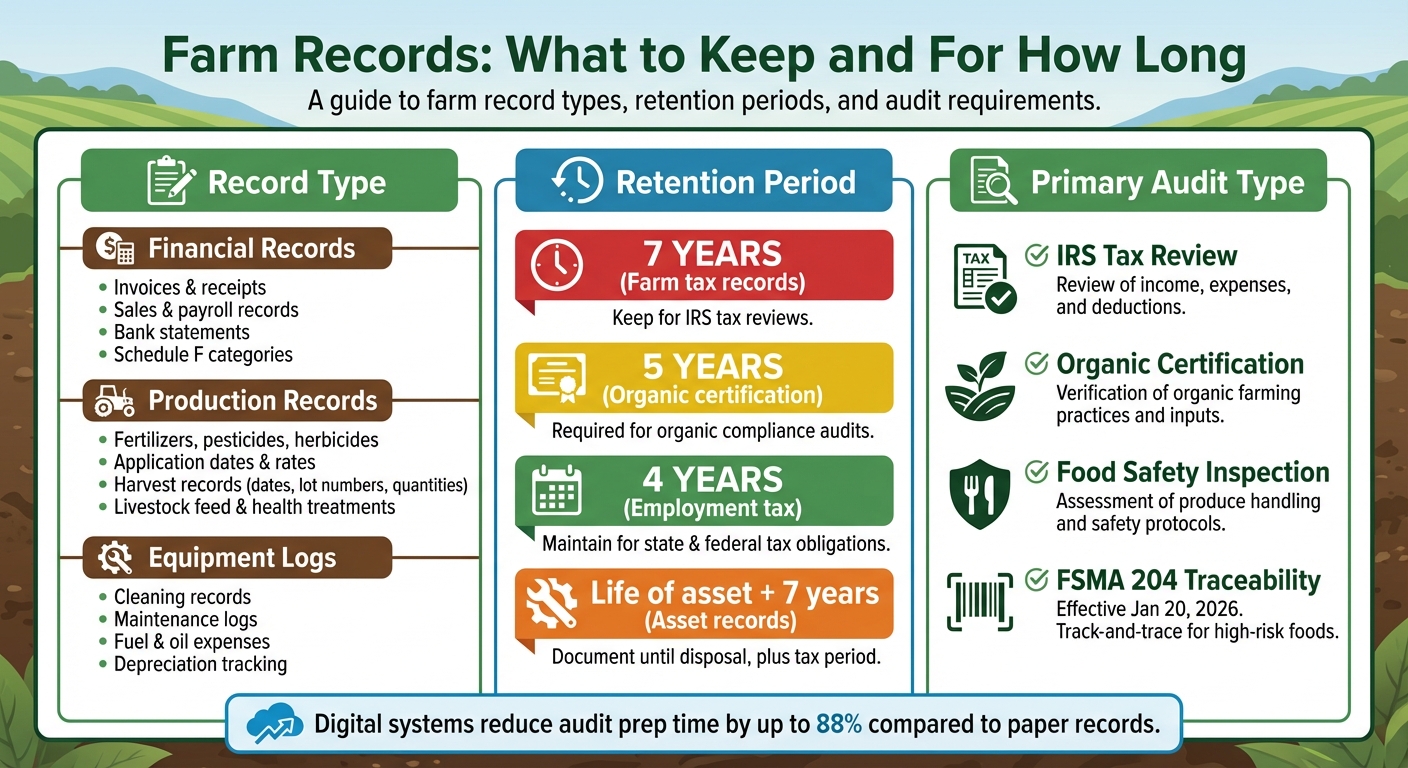
Farm Record Retention Periods and Requirements by Audit Type
Auditors typically focus on three key types of documentation: financial records, production data, and equipment logs. Each plays a distinct role in showcasing your farm’s operations. Centralizing these records in a farm management hub ensures everything is accessible during an inspection. Missing any of these categories can lead to compliance issues and delays in certifications. Here's a closer look at what each entails.
For financial records, the IRS mandates a comprehensive summary of business transactions, including gross income, deductions, and credits. To meet this requirement, keep invoices, receipts, sales and payroll records, bank statements, and deposit slips. Organize these documents according to Schedule F categories - such as feed, seeds, fertilizers, labor, repairs, and interest - to streamline tax preparation.
Production records are essential for tracking inputs, practices, and outputs. Organic certifiers use "mass balance" audits to ensure that the quantity of seeds purchased aligns with the total harvest and sales. Keep detailed records of fertilizers, pesticides, and herbicides, noting product names, manufacturers, application dates, field IDs, and rates. Harvest records should include dates, lot numbers, field IDs, crop varieties, and total quantities. If you manage livestock, document feed types, dry matter intake calculations, grazing rotations, and health treatments.
Equipment logs are vital for both tax deductions and compliance. Cleaning records are particularly important to demonstrate adherence to organic standards when machinery is used for both organic and non-organic applications. Maintenance logs, on the other hand, help you claim deductions for repairs, fuel, and oil on Schedule F while also tracking depreciation on major assets. Each entry should include the service date, description of work, costs for parts and labor, and equipment ID.
| Record Type | Retention Period |
|---|---|
| Farm tax records, income, and expenses | 7 years |
| Organic certification records | 5 years |
| Employment tax records | 4 years |
| Asset records (depreciation) | Life of asset + 7 years |
Step 1: Choose a Digital Record-Keeping System
Going paperless with a digital record-keeping system is a game-changer for maintaining audit-ready farm records and improving day-to-day operations. Relying on paper records often leads to issues like faded receipts, missing dates, or incomplete weather logs, which can raise red flags during an audit. A digital system eliminates these problems by automatically capturing GPS data, timestamps, and weather details, ensuring your records meet audit requirements.
Look for a platform that connects every stage of your farm's operations - seed purchases, field applications, harvest logs, and sales - into a seamless traceability chain, which is a must for organic audits. Additionally, your system should categorize expenses based on IRS Schedule F categories, such as feed, seeds, fertilizers, labor, repairs, and interest. This feature can save you a lot of time and effort when tax season rolls around.
How HarvestYield Makes Record-Keeping Easier
HarvestYield simplifies record-keeping by automatically logging job details through its mobile app. It captures GPS locations, timestamps, and weather conditions the moment your team begins a task. This real-time weather tracking is especially helpful for activities like spraying and fertilizing, where you need to show auditors that wind speeds and conditions were safe. Even in areas with poor cell service, the platform works offline, syncing all data to the cloud once you're back online. Plus, its digital invoicing feature ties completed tasks directly to your financial records, creating a clear audit trail that inspectors expect.
Getting Started with HarvestYield
To set up HarvestYield, start by defining your core activities - tasks like spraying, planting, mowing, or harvesting. This will form the structure for organizing your records. Next, input your farm's key details, such as client profiles, field boundaries, and equipment information. The field mapping tool allows you to trace property lines by walking or driving with your phone, ensuring accurate acreage measurements. This data is crucial for subsidy applications and billing accuracy.
Once your infrastructure is set up, you can create jobs by assigning specific activities to fields and team members. When workers begin a task using the mobile app, HarvestYield automatically logs all the necessary data. The platform even offers a free tier, letting you test the system on up to 50 active acres before deciding on a paid plan. With your digital system capturing every detail, the next step is to systematically organize and categorize these records.
Step 2: Organize and Categorize Your Records
Once your digital system starts capturing data, the next step is to organize it in a way that makes compliance verification straightforward for auditors. A well-structured system not only speeds up audit processes but also ensures all necessary information is easily accessible. The key is to separate records into distinct categories, keeping financial data apart from production data. This clear division simplifies both tax audits and regulatory inspections by helping auditors quickly locate the information they need.
Set Up Main Record Categories
After data collection begins, it's essential to organize it systematically. Align your record categories with the requirements of IRS Schedule F and organic certification standards. For production data, create a "seed-to-sale" audit trail that tracks every stage of a crop's lifecycle - from sourcing seeds and planting to applying inputs, harvesting, storing, and selling. This traceability is vital for organic inspections, including mass-balance checks, which verify that harvested quantities match sales records.
| Main Category | Key Sub-Categories to Include |
|---|---|
| Financials | Income receipts, expense invoices, bank statements, asset depreciation logs |
| Crops | Seed labels, planting dates, input applications (fertilizer/pesticide), harvest yields |
| Livestock | Identification, weights, health/vet records, breeding dates, feed costs |
| Machinery | Maintenance logs, equipment cleaning/sanitation records, fuel usage |
| Labor | Paid/unpaid hours, employee training records (e.g., Worker Protection Standard) |
To ensure quick and consistent file retrieval, adopt standardized naming conventions, such as "2026_Field_SoilTest_NorthPasture". This consistency is especially important when multiple team members are involved in data entry. Brenden, Director of Farming Operations at Jacob's Farm in Freedom, California, emphasizes the importance of uniformity:
"Standardized forms with clear instructions on how to record information ensures that regardless of how many crops you have, or the number of staff that are keeping records, all records will be kept the same way".
At Jacob's Farm, their system divides each crop succession into planting, growing, harvesting, and post-harvest steps. This setup allows multiple staff members to log data simultaneously while maintaining a clear, organized audit trail.
Use Digital Tools for Organization
Digital tools like HarvestYield can take your organization to the next level. For example, its field mapping feature enables you to create accurate digital maps by walking or driving along field boundaries with your phone. These maps are particularly useful during organic inspections, where you may need to show buffer zones between organic and conventional fields or prove that certain inputs were applied only in designated areas. GPS data linked to each job adds another layer of traceability, ensuring activities are tied to specific field locations. You can even attach photos of receipts directly to jobs, offering long-term documentation that meets compliance requirements.
Step 3: Log Activities Daily
Keeping daily logs is essential for maintaining an audit-ready system, ensuring compliance and providing valuable operational insights. Delaying this process can lead to missing crucial details needed for audits. During busy harvest seasons, relying on memory often falls short, leaving you scrambling to recreate data auditors will demand. Real-time logging captures accurate, unalterable environmental conditions, while well-organized daily records can cut the time spent on farm audits from days to just a few hours. Here's how HarvestYield simplifies this process.
Record Job Details with GPS and Weather Data
HarvestYield takes the hassle out of manual data entry by automatically logging GPS coordinates, timestamps, and weather data. For spray jobs, it syncs with local weather reports to document wind speed, temperature, and humidity - key details auditors use to verify safety and Re-entry Intervals (REI).
Daily logs should cover all field activities, including seeding, transplanting, weed management, cultivation, harvesting, pest control, and compost production. When applying chemicals or materials, record product details, application rates, and methods. For harvests, document the date, lot number, field ID, crop variety, quantity harvested, and storage or sales details. Labor tracking is just as important - record hours worked, tasks performed, and piece rates for harvests since labor accounts for 30–40% of total farm production costs.
Train Your Team to Log Consistently
While HarvestYield automates much of the data collection, consistent team participation is crucial. Get your team involved early by showing how reducing paperwork saves time. During training, highlight features like the mobile apps in agriculture offer offline functionality, which allows data logging from the field or barn without internet access. Demonstrate how the system auto-fills GPS and weather data, minimizing manual input.
Host training sessions and offer one-on-one support before the busy season begins. Provide simple, one-page visual guides that outline how to log common activities. Standardized forms with clear instructions ensure consistency across all entries. To minimize errors, consider a dual-verification process where one team member logs data and another reviews it - this can reduce mistakes by up to 60%. Lastly, establish a fixed time each day for logging, such as immediately after a harvest or during cleanup. Making record-keeping a routine task ensures accuracy and prepares the groundwork for timely reviews and updates in the next stage.
Step 4: Review and Update Your Records
Daily logs are essential, but weekly reviews help catch errors before they turn into bigger problems during audits. By dedicating time to review your records regularly, you ensure accuracy and consistency. Set aside 15–30 minutes every Friday to go over the week's entries. Check that your field activity sheets, input records, and maintenance logs are complete and up-to-date. Cross-check receipts with recorded expenses and reconcile your bank accounts promptly to avoid discrepancies. Regular reviews connect your daily efforts to a solid foundation for audit readiness.
Schedule Regular Record Reviews
How often you review your records depends on your farm's specific needs and risks. Areas like financial reporting, compliance, and food safety may call for quarterly or semi-annual reviews, while general maintenance logs might only need an annual check. For farms with high activity levels, such as those managing multiple planting cycles, it’s smart to make record reviews part of your daily routine. For example, Jacob's Farm adopted a phased approach to frequent record reviews, ensuring their data stayed audit-ready.
Each month, perform a traceback by selecting a specific lot and verifying every step - from planting and inputs to harvest, storage, and sale - is properly documented. Compare your total harvested crops with the quantity sold to confirm that your yields match planting records. Monthly gap analyses can also help identify missing certifications or incomplete traceability. Keep in mind that organic records must be stored for at least five years, while farm tax records should be retained for a minimum of seven years.
Back Up Your Data
Backing up your records is just as important as reviewing them. A secure backup system ensures your data is safe and accessible when needed. HarvestYield’s cloud-based system automatically saves your records, making them readily available for inspectors. The IRS accepts electronic records as long as they are accurate, accessible, and properly backed up. Cloud storage also provides a safeguard against disasters, ensuring your records are never lost.
HarvestYield even supports offline data entry, allowing you to save records locally on your device and upload them once you’re back online. This feature ensures an uninterrupted audit trail. To stay organized, photograph and upload receipts immediately, and generate monthly profit and loss statements to catch any errors early. Using dedicated bank accounts and credit cards exclusively for farm-related transactions also helps maintain a clear digital audit trail, avoiding confusion caused by personal expenses. Backing up your records strengthens your daily logging and periodic reviews, keeping your farm prepared for audits at all times.
Conclusion
Keeping farm records audit-ready doesn’t have to be complicated. The secret lies in using a digital system that simplifies the process: automating data collection, consistently tracking activities, organizing records into clear categories, and regularly reviewing your data. With these steps, record-keeping becomes less of a hassle and more of a strategic tool.
Digital platforms like HarvestYield take the guesswork out of compliance. They automatically log essential details like GPS coordinates, weather conditions during applications, and harvest intervals. This automation not only ensures compliance but also slashes preparation time for audits.
In fact, digital documentation can save up to 88% of the time typically spent preparing for audits compared to paper-based methods. One fruit company even reported a staggering 95% reduction in audit preparation time after switching to digital safety documentation.
Looking ahead, staying ahead of regulatory changes is crucial. For example, FSMA 204 traceability requirements in the U.S. will take effect on January 20, 2026, and Europe will mandate electronic crop application records starting the same year. By adopting digital record-keeping now, you’re not just ensuring compliance - you’re also unlocking valuable insights into soil health, pest cycles, and crop profitability over time.
Investing in digital tools today means smoother audits and better operational insights tomorrow. Your future self - and your auditor - will appreciate it.
FAQs
What’s the fastest way to switch from paper to digital farm records?
The fastest way to move from paper to digital farm records is by using a cloud-based system that allows for quick data entry and instant access. Begin by choosing a straightforward platform that fits your needs. Once selected, you can upload or manually input your existing records. Many of these tools come with pre-made templates and are mobile-friendly, making it easy to enter data directly from the field. This approach simplifies the process, helping you transition more smoothly and efficiently.
How do I prove seed-to-sale traceability in an audit?
To show seed-to-sale traceability during an audit, maintain detailed records for every step of the crop's journey. This means tracking everything from seed sourcing and planting to the inputs used and the final harvest. Make sure your documentation is well-organized and easy to access, so you can quickly provide the necessary information for any traceback requests.
What should I do if my team forgets to log jobs in real time?
If jobs aren't logged in real time, make it a priority to record the details as soon as the task is completed. Tools like HarvestYield can be a game-changer, allowing you to save data offline and sync it once you're back online. By encouraging consistent documentation right after tasks, you can ensure your records stay accurate. This approach minimizes the risk of missing information, which is critical for staying audit-ready and meeting compliance requirements.