How Digital Templates Reduce Errors in Farm Records
If you want fewer farm record mistakes, switch the record itself - not just the person filling it out. I’d boil the research down to this: structured digital templates cut missing fields, bad units, wrong field IDs, and memory-based write-ups far better than paper logs.
Here’s the short version:
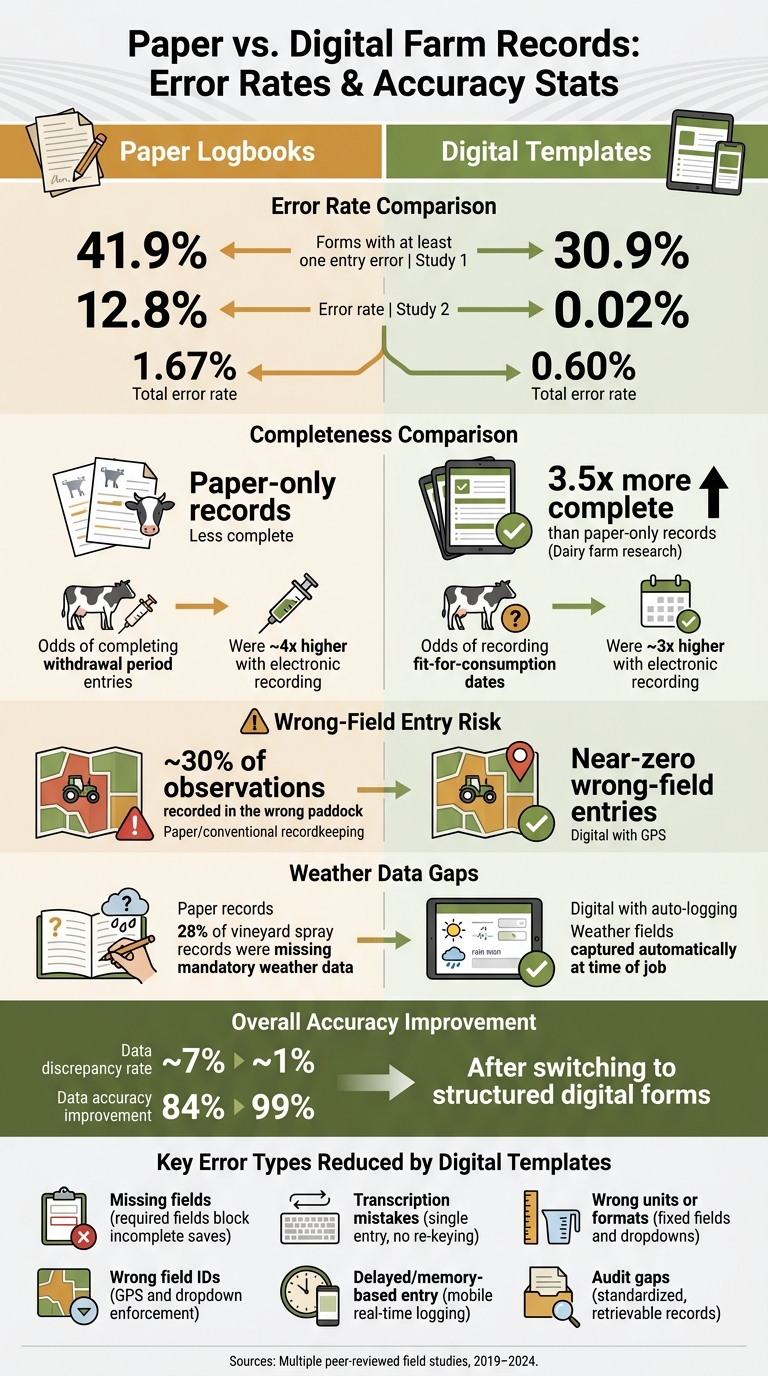
- Paper creates more errors. One study found 41.9% of paper forms had at least one entry error, vs. 30.9% for electronic forms. Another found 12.8% for paper vs. 0.02% for electronic.
- Required fields reduce blank records. In dairy research, digital records were 3.5 times more complete than paper-only records.
- Dropdowns, fixed units, and date pickers reduce bad entries. They help stop mix-ups like wrong rates, unclear dates, and inconsistent field names.
- Real-time entry reduces memory mistakes. Logging the job in the field is more accurate than filling it out hours later.
- GPS, timestamps, and weather logs reduce wrong-field and missing-detail problems. That matters for spray records, maintenance logs, harvest records, and compliance files.
- Digital forms still need to be set up well. Bad defaults, unclear labels, and poor fit with field work can still lead to bad data.
In other words: digital templates don’t remove human error, but they do remove many paper-based problems. For a U.S. farm manager, that usually means cleaner spray logs, better cost tracking, fewer gaps during audits, and fewer disputes over what happened, where, and when.
| Record issue | Paper logbooks | Digital templates |
|---|---|---|
| Missing fields | Common | Much less common |
| Transcription mistakes | High risk | Low risk |
| Wrong units or formats | Common | Reduced by fixed fields |
| Wrong field IDs | Easier to miss | Reduced with GPS and dropdowns |
| Delayed entry | Common | Less likely with mobile entry |
| Audit readiness | Often weak | Usually better |
I see the main takeaway as simple: the best farm records come from forms that force the right data in the right format at the time the work happens.
Paper vs. Digital Farm Records: Error Rates & Accuracy Stats
Evidence That Digital Templates Improve Accuracy and Completeness
Paper vs. Digital Data Collection: What Field Studies Found
Field studies show a clear pattern: when people enter data straight into digital forms, they make fewer mistakes than when they write it on paper first.
A 2019 study found that 41.9% of paper questionnaires had at least one entry error, compared with 30.9% of electronic questionnaires. The total error rate was 1.67% for paper and 0.60% for electronic records. A 2024 study showed an even bigger gap: 12.8% error rate for paper records versus 0.02% for electronic records.
The reason is pretty simple. Paper systems often add an extra handoff: someone writes the information down, and then someone has to type it into a system later. That extra step creates room for mix-ups, skipped details, and plain old typos. Direct digital entry cuts out that transcription step, so the improvement happens at the moment data are entered, not after the fact.
How Structured Forms Produce More Complete Records
Digital forms also help with completeness in a way paper forms just can't. Required fields and validation rules can stop a record from being saved until the key details are filled in.
One of the clearest examples comes from dairy farm research. A University of Guelph-linked study found that farms using digital records captured complete treatment data 3.5 times more often than paper-only operations. Another study of dairy farms in England and Wales found that the odds of completing milk and meat withdrawal period entries were about four times higher with electronic recording than with paper. The odds of recording the date when milk and meat would be fit for human consumption were about three times higher.
That has direct carryover to spray logs, treatment records, harvest tallies, and maintenance work orders. If a worker leaves out a date, rate, lot number, or sign-off, the record may not hold up for compliance, billing, or internal review. Fixed fields and validation checks help close those gaps by making the record format more consistent from the start.
The comparison below shows how this looks in day-to-day record keeping.
Comparison Table: Paper Records vs. Digital Templates
| Factor | Paper Logbooks | Digital Templates |
|---|---|---|
| Error rate | High; 41.9% of paper forms had at least one entry error in one study | Low; as low as 0.02% in one study |
| Missing fields | Common; no enforcement mechanism | Rare; required fields block incomplete records |
| Transcription risk | High; data are re-entered from paper into software | Minimal; data are entered once and synced centrally |
| Completeness | Low to moderate; depends on worker discipline | High; treatment data were 3.5 times more complete in one dairy study |
| Compliance readiness | Weak; records can be hard to retrieve and often incomplete | Strong; standardized and easier to audit |
| Operational impact | Slower reporting and more manual work | Faster reporting and better team coordination |
That said, not every digital tool gets the same results. Device type, interface design, and training quality all shape how well a system works in the field. The gains seen in research came from structured templates with required fields, logical validation, and interfaces made for field use. The next factor is how specific template features - like fixed fields, validation, and timestamps - help stop those errors in the first place.
Transform Your Agricultural Team
Streamline job management, field mapping, and machine tracking with HarvestYield. Simplify your operations and eliminate paper job sheets.
ContinueWhy Structured Digital Forms Cut Down on Errors
Fixed Fields, Required Entries, and Validation Checks
A big part of the error reduction comes from the controls built into the form itself. Structured forms cut down on bad entries by narrowing what a person can enter in the first place. If a product rate field accepts only numbers tied to one unit, a worker can’t type 3 gal into a field meant for fl oz per acre. If field names come from a dropdown, entries like NW 40, 40 NW, or a local nickname all get recorded the same way. Date pickers enforce MM/DD/YYYY by default, and time fields block fuzzy entries like “about 7 p.m.” Together, those controls reduce missing, inconsistent, and miskeyed entries.
Required fields help too. If a spray job template requires an application date, start time, stop time, acres covered, and machine hours, those items must be filled in before the record can be saved. Validation checks add one more guardrail. A system can flag a stop time entered before the start time or warn when recorded acres are far outside the mapped field size. In one dairy data-quality study, 17.2% of related data points were flagged as impossible or suspicious when systems lacked constraints. That shows how messy records can get when those checks aren’t in place.
Entering Data in Real Time Cuts Memory and Transcription Errors
Waiting to enter data later opens the door to memory mistakes. A sprayer operator who logs records hours after the job may mix up field IDs, leave out times, or enter the wrong rate. LSU AgCenter recordkeeping guidance says growers should record the date and time of activities when the event happens, while the details are still fresh. That advice is pretty simple: write it down when it happens, not when you finally get back to the shop.
When an operator logs the field name, product and rate, start time, stop time, and acres covered in a mobile apps right after a job - or while doing it - the record is much more likely to match what actually happened. For planting and harvesting, that helps keep the right seed variety linked to the right field and seeding rate. For maintenance work, it helps preserve exact dates, machine hours, and parts used before those details slip away.
Adding GPS and time stamps tightens things even more by linking each record to a specific field and job time.
When Digital Templates Still Fall Short
Digital forms can still produce bad data. A weak template can cause just as many problems as a paper log.
One common issue is unchecked default values. If a form auto-fills yesterday’s date or a standard product rate, a busy worker may leave it as is without noticing. That can spread the same mistake across a lot of records. Vague field labels can also trip people up, especially when one field tries to cover more than one idea or doesn’t make the unit clear.
Some comparisons found that electronic tools offered only limited gains when the forms didn’t fit the actual workflow. The fix is pretty direct:
- Use structured fields for the data that matters most
- Add prompts that ask workers to confirm or change any pre-filled value
- Keep free-text notes for observations that don’t fit a fixed field
That’s where location data and weather fields come in next.
GPS, Weather, and Job Data as Tools for More Accurate Records
How GPS and Time Stamps Reduce Wrong-Field Entries
Location and time are two of the most useful fields in a farm template. They help stop one of the most common record problems: logging work in the wrong field or at the wrong time. When GPS and time stamps are added at the moment a job is entered, each record is tied to a specific place and time.
GPS field mapping connects every job to an exact location. Automatic GPS capture at the start and end of a task helps confirm which field boundary the work happened in. A mobile app built to record farm machine operations through smartphone GPS showed how well this can work: it could separate operations by field and calculate field area, with recorded time values within about 10 to 15 seconds of actual values.
That kind of detail matters more than it may seem at first glance. In one pasture management study, nearly 30% of observations were recorded in the wrong paddock when operators used conventional record-keeping instead of location data. Add a field ID, GPS coordinates, and timestamps, and you get a clear trail that helps keep labor, inputs, and machine hours tied to the right field.
Why Recording Weather Data Improves Job Records
Weather data isn't just nice to have. For many spray records, it's required. During spray applications, temperature (°F), wind speed (mph), wind direction, humidity, and rainfall all shape drift risk, product performance, and whether the application meets label rules.
And this is where paper or memory-based logging often falls apart. California's Department of Pesticide Regulation found that weather data were missing from 28% of vineyard spray records, even though temperature, wind speed, and wind direction are mandatory fields. That's a big gap.
On-field weather stations can fill in wind, humidity, and rainfall automatically at the time of logging. That cuts manual entry and helps produce records that are ready for inspection.
These are the kinds of fields digital job forms should collect on their own, right when the work happens, not later when the crew is back at the shop.
Putting the Research Into Practice With HarvestYield
How HarvestYield Aligns With the Research on Error Reduction
The research above points to a simple idea: if you want fewer recordkeeping mistakes, you need better controls at the moment work gets done. In practice, that usually comes down to fixed fields, real-time capture, and automatic location data. HarvestYield applies those same controls with fixed fields, real-time entry, GPS capture, and automatic weather logging.
When an operator starts a job in HarvestYield, the platform records GPS location, field boundaries, and timestamps right away. It also logs weather conditions like wind speed, temperature, and precipitation during field work, which helps support complete job and compliance records. That matters because the record stays tied to the right job and the right field as the work happens, instead of being filled out later from memory. The result is a drop in data discrepancy rates from about 7% with paper records to about 1% with digital platforms.
HarvestYield also brings scheduling, client records, field maps, and machine costs into one system. That means less bouncing between tools and less re-entry. Digital job sheets keep machine usage connected to the correct job and field, which cuts down on mix-ups.
Day to day, those controls lead to better accuracy, more complete records, and cleaner audit preparation.
Conclusion: Key Findings for U.S. Farm Managers
The evidence from multiple studies lands in the same place. Digital templates cut errors by standardizing what gets recorded, requiring key fields, and logging GPS and weather data automatically at the time of the job, not hours later when someone is trying to piece it together from memory. One cloud-based farm management system showed data accuracy increasing from 84% to 99% after manual workflows were replaced with structured digital forms.
For U.S. farm managers, the payoff shows up in a few clear ways:
- Fewer missing fields in compliance documents
- Fewer wrong-field entries in cost and yield records
- Cleaner audit trails for spray and treatment logs
- Better team coordination without paper job sheets moving from hand to hand
FAQs
What should a farm template require?
An effective farm template should make data entry consistent, so records stay clean and mistakes are less likely.
That means every entry should ask for the core details up front:
- Date
- Field location
- Specific task
- Quantities
It also helps to include the extra context that turns a basic note into a useful record. Think GPS location, machine used, operator, and weather conditions.
To keep entries uniform, use drop-down menus where you can and stick to standard units like acres, gallons, and hours.
Can digital forms still create bad records?
Yes. Digital forms can still lead to bad records if people don’t use them the right way, even though they usually cut down on mistakes compared with paper.
At the end of the day, accuracy still comes down to the basics: team training, clear expectations, and regular checks on data like field maps so GPS stays calibrated and boundaries line up with what’s happening on the ground.
Tools like HarvestYield can also help teams record data more consistently as the work gets done.
Which farm records benefit most from digital templates?
Digital templates are a strong fit for records that need precision, frequent updates, or close analysis, like spray applications, job scheduling, and equipment cost tracking.
With HarvestYield, GPS locations, weather data, and start and finish times are captured automatically. That cuts down on manual mistakes and keeps records accurate, organized, and easy to pull up for compliance, billing, and long-term farm planning.