Farm Software vs. Spreadsheets: Cost Analysis
Managing farm expenses is no longer optional - it’s critical. Farmers typically rely on two tools: spreadsheets or farm management software. Spreadsheets are free and familiar but require manual input and are prone to errors as farms grow. Software automates tasks, saves time, and provides real-time insights but comes with subscription costs ranging from $150 to $5,000+ per year.
Key findings:
- Spreadsheets: Free upfront but demand significant time (15+ hours/week for data entry) and are error-prone.
- Software: Costs vary by farm size, but it slashes administrative time to under 1 hour/week and reduces costly mistakes.
Quick Comparison:
| Factor | Spreadsheets | Farm Software |
|---|---|---|
| Cost | $0 upfront | $150–$5,000+ annually |
| Time Investment | 12–20 hours/week | 1–2 hours/week |
| Error Risk | High | Low |
| Scalability | Limited | High |
| Data Access | Local | Cloud-based, mobile |
For small farms (under 500 acres), spreadsheets may suffice if workflows are simple. Larger or complex operations benefit more from software, which saves time and reduces errors. Going paperless during slower months can ease the switch.
Is Harvest Profit Better Than a Spreadsheet?
You can find more farm management videos to help optimize your operations.
Transform Your Agricultural Team
Streamline job management, field mapping, and machine tracking with HarvestYield. Simplify your operations and eliminate paper job sheets.
ContinueCost Analysis Framework
When comparing farm management software to spreadsheets, it’s essential to look beyond subscription fees. The real costs include both direct expenses and the value of time spent on administrative tasks.
Defining Cost Categories
For a thorough analysis, costs are divided into four main categories that impact farm operators:
- Initial investment: The upfront cost (or lack thereof) to start using the tool.
- Recurring expenses: Ongoing fees, such as software subscriptions or licensing costs.
- Labor and time costs: The hours spent entering data, generating reports, and managing administrative tasks.
- Error and risk costs: The financial consequences of mistakes, missed deadlines, or inaccurate records.
These categories provide a framework to assess the overall financial impact of each option.
Comparison Approach
Let’s take a closer look at these costs in practice. While spreadsheets are free, the hidden labor costs can add up quickly. For instance, spending 15 hours a week on spreadsheet-related tasks at $25/hour translates to roughly $19,500 annually.
"The math on whether spreadsheets or dedicated software makes more financial sense for a commercial operation looks deceptively simple until you start tracking the hours and the mistakes." - PollenOps
This approach highlights the total cost of ownership for both options, helping farm operators make informed decisions based on the actual costs - not just what’s visible on a bill.
Farm Management Software Costs
Common Cost Components
The cost of farm management software can vary significantly based on the scale of your operation. For smaller setups, basic tools are typically priced between $150 and $500 per year, while more advanced commercial platforms range from $500 to $2,500 annually. For large-scale enterprises, costs often exceed $5,000 per year, and comprehensive solutions that include setup, training, and additional features can surpass $50,000.
Approximately 67% of farm management platforms use a subscription-based (SaaS) model, which helps keep upfront expenses low, especially for smaller and mid-sized farms. This model eliminates the need for server hardware or IT maintenance, and updates are usually included. Providers like HarvestYield offer tiered pricing plans, allowing you to pay only for the features you actually use. However, enterprise-level solutions often come with significant initial setup and training costs, ranging from $15,000 to $75,000. Before committing, it’s essential to clarify what kind of onboarding and support is included.
These pricing structures help set the context for understanding how these tools can save time and reduce labor costs.
Labor and Time Savings
While subscription fees are the most visible cost, the real financial advantage of farm management software often lies in its ability to save time and streamline operations. By capturing job data directly in the field via GPS and syncing it automatically to the office, these platforms eliminate the need for paper job sheets and manual data entry, saving hours of administrative work each week.
Large-scale operations can see a 15–20% reduction in administrative overhead after adopting a management platform. Features like integration with accounting tools such as QuickBooks or Xero allow invoices to be sent immediately after a job is completed, rather than waiting for manual processing. Steven Houlston of Houlston Contracting shared his experience with job tracking software:
"The app made it easy to see when the last filter change was. On one machine, a set of filters had only done 189 hours."
This kind of real-time tracking goes beyond what spreadsheets can offer. It not only boosts efficiency but also minimizes costly mistakes related to field identification and equipment maintenance scheduling, helping to avoid financial setbacks.
Spreadsheet Costs
Direct and Indirect Costs
At first glance, spreadsheets seem like an affordable option. Google Sheets is free, and Microsoft Excel is often included with an Office subscription, making the direct cost feel like $0 for most farms. In comparison, dedicated software can range from $300 to over $2,000 annually.
But the real costs of spreadsheets show up elsewhere. Manual data entry and complex formulas increase the chances of errors, which can skew production records, tax filings, or equipment costs. Douglas Shoemaker highlights this risk:
"One transposition error in a formula, one misplaced decimal, and suddenly your numbers don't tie out. These costly mistakes compound over time."
Spreadsheets also fall short when it comes to audit trails. They don’t track who made changes or when, which can lead to compliance headaches. For example, during state inspections or audits for restricted-use pesticides, missing date stamps and user logs can cause serious issues.
On top of these direct concerns, the time spent managing spreadsheets adds another layer of hidden costs.
Hidden Labor Costs
Spreadsheets bring more than just upfront costs - they demand a hefty investment of time. Farmers using manual spreadsheets often spend over 10 hours a month just on data entry and calculations. As operations grow, this time commitment skyrockets. This is especially true when trying to coordinate and track agricultural teams across multiple locations. A single field representative might spend anywhere from 150 to 300 hours per season manually transcribing data.
And it’s not just about the hours. The process of managing files, fixing errors, and dealing with version conflicts adds even more frustration. Scott Manley of Manley Farms describes it perfectly:
"A spreadsheet... becomes a graveyard of abandoned tabs named '2023 final v4 final-final.'"
Simple tasks, like generating a delivery report, can take 45 to 60 minutes in a spreadsheet, compared to just 2–3 minutes in specialized software. Over an entire season, this extra time becomes a major drain on resources, pulling energy and focus away from other critical tasks.
Side-by-Side Cost Comparison
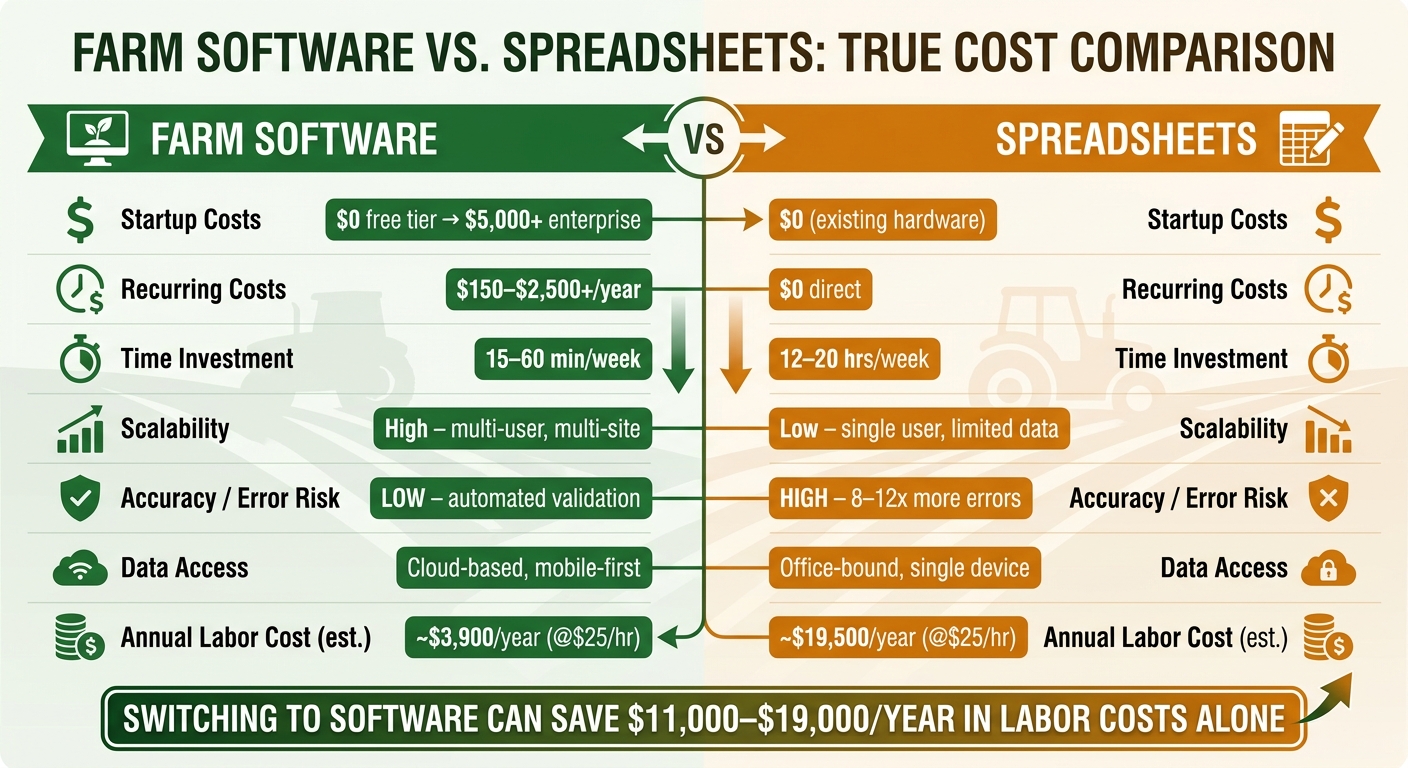
Farm Software vs. Spreadsheets: True Cost Comparison
Comparison Table
To give you a clear picture of the costs we've discussed, here's a table that directly compares spreadsheets and farm management software. It focuses on key cost factors and highlights the differences between manual and automated approaches.
| Cost Factor | Spreadsheets (Manual) | Farm Management Software (Automated) |
|---|---|---|
| Startup Costs | $0 (assuming existing hardware) | $0 (free tiers) to $5,000+ (enterprise setup) |
| Recurring Costs | $0 direct cost | $150–$2,500+ per year (subscription) |
| Time Investment | 12–20 hours/week (manual input) | 15–60 minutes/week (automated, mobile-friendly) |
| Scalability | Low – struggles with multiple users or complex data | High – supports multi-user and multi-site operations |
| Accuracy Risk | High – error rate 8–12 times higher | Low – automated validation and audit trails |
| Data Access | Office-bound or limited to a single device | Cloud-based and mobile-first |
| Analysis Depth | Limited to manual formulas | Automated per-crop/per-field profit and loss |
Spreadsheets demand significant manual effort and are prone to errors, while farm management software streamlines tasks, cutting time investment dramatically. For example, switching to software can save around $11,000–$19,000 annually if you calculate labor at $20/hour. That’s a substantial reduction in costs.
But it’s not just about time. Software also minimizes errors, which is critical for tasks like tax filings, compliance, and contracts. Spreadsheets, on the other hand, come with an error rate that's 8 to 12 times higher. Data management is another area where software pulls ahead. While spreadsheets offer local control, they lack the advanced export and cloud-based features that software provides, such as exporting in formats like CSV or JSON.
"A record keeping stack - two or three tools that talk to each other and cover the gaps - is the realistic target." - Scott Manley, Technologist
Platforms like HarvestYield take this a step further by automatically tracking machine costs and GPS job records, and field data, all stored securely in the cloud. These capabilities improve both data accuracy and accessibility, making software a more efficient option for many farm operations.
Which Option Fits Different Farm Sizes
Small Farms vs. Larger Operations
When choosing tools for your farm, size and operational complexity play a big role. It's not just about acreage; how you manage your day-to-day operations matters too. For farms under 500 acres, especially those run by a single operator, spreadsheets can often handle the basics. These include tasks like filing Schedule F taxes, managing crop insurance paperwork, and tracking production history. This aligns with earlier discussions about subscription vs. purchase costs.
A good way to evaluate your needs is the "three-season test": if your spreadsheet stays accurate and up-to-date for three growing seasons without any gaps, it’s probably sufficient. If not, that frustration might be a sign to consider software.
Scott Manley puts it well:
"The spreadsheet works well for single-operator farms under a few hundred acres... It breaks down when multiple people need to edit records simultaneously."
For larger farms - those exceeding 500 acres or managing both livestock and crops - things get more complicated. Administrative tasks grow, mirroring the earlier comparison of labor costs.
That said, even some smaller farms, like CSAs or those growing a variety of vegetables, might need software. Planning for crop rotations, harvest schedules, and weekly deliveries is far more complex than managing a single crop.
If you're thinking about switching to farm management software, timing is key. Making the transition during slower months, like fall or winter, can help. This gives you time to import past data, map fields, and test the system alongside your current methods before the busy season kicks in. Platforms like HarvestYield are designed with team workflows in mind, offering features like multi-user access, GPS job tracking, and machine cost management that can grow with your farm’s needs.
Break-Even Considerations
Figuring out when farm management software starts paying off is a big deal. Using earlier cost comparisons as a foundation, break-even analysis helps measure the actual savings from adopting this software. Below is a benchmark table showing typical payback periods based on farm size.
Estimating Break-Even Points
The formula is simple:
Payback Period = Total Investment Cost ÷ Annual Net Benefit
To calculate the Annual Net Benefit, add up the value of saved administrative hours (multiplied by the hourly rate), avoided error costs, and resource savings.
For example, using $25/hour as the rate for administrative time: If your farm spends 15 hours per week on spreadsheet tasks, that's $19,500 per year. Software that cuts this to just 2–3 hours weekly saves you roughly $15,600 annually.
Error prevention also plays a huge role in savings. Errors in spreadsheets can cost a fortune - nearly 90% of commercial users face preventable contract mistakes due to error rates that are 8–12 times higher than they should be. Think about missed invoices, double-booked equipment, or compliance slip-ups. Adding up what these errors cost you last season can help calculate your "Error Prevention Value."
To make things clearer, here’s a table showing typical payback periods by farm size:
| Farm Size | Typical Annual Software Cost | Primary Savings Driver | Avg. Payback Period |
|---|---|---|---|
| Small (under 250 acres) | $500–$2,000 | Input reduction and compliance | 1–2 years |
| Medium (250–1,250 acres) | $2,000–$8,000 | Yield improvement and labor efficiency | 1–2 years |
| Large (1,250–5,000 acres) | $8,000–$25,000 | Financial visibility and supply chain | 1–3 years |
| Enterprise (5,000+ acres) | $25,000–$100,000+ | ERP integration and multi-site management | 2–4 years |
These numbers highlight the clear financial benefits of switching to automated software. Here's a tip: Build a worst-case scenario into your analysis. Ask yourself, What if implementation takes six months longer than planned? Or, What if savings are 20% lower than expected? If your investment still breaks even under those conditions, it’s likely a smart move. You can also speed up the payback period by starting with modules that deliver quick wins, like tracking machine costs or automating agricultural billing, instead of waiting for a full-system rollout.
Bottom-Line Cost Decision
Choosing between spreadsheets and farm management software comes down to the size of your operation and the hidden costs tied to manual data handling. For smaller farms - those under 500 acres with straightforward, consistent workflows - spreadsheets might still do the job, as discussed in the earlier farm size breakdown. However, it’s important to weigh the trade-off between manual effort and automation carefully.
Consider whether your current system is holding you back. The hidden costs of sticking with spreadsheets can sneak up on you. Manual data entry can eat up hours every week. For example, if your time is worth $100 per hour, spending just 10 hours a week on manual tasks could amount to over $52,000 a year. On the other hand, farmers who transition to dedicated software often save more than 10 hours each month on data entry alone, with overall efficiencies leading to 5% to 15% in direct cost savings.
For larger operations - those managing over 500 acres or juggling multiple fields, employees, and equipment - the case for software becomes even stronger. Tools like HarvestYield simplify things by consolidating job details, GPS data, equipment costs, and field records into one system. This eliminates the need for paper job sheets and reduces repetitive data entry. Instead of being a chore, record-keeping becomes a valuable resource for running your farm more effectively.
"The time you spend managing spreadsheets is time you're not spending on management decisions that actually move the needle." - Douglas Shoemaker, Solentra
Another key factor is safeguarding your historical records. While the efficiencies of farm management software are clear, protecting your data is equally critical. Before subscribing to any platform, make sure it offers full data export options - whether in CSV, JSON, or Shapefile formats - even if you decide to cancel your subscription. Your historical records are a long-term asset, and avoiding vendor lock-in is just as important as keeping your monthly costs under control.
FAQs
How do I calculate my true spreadsheet cost?
When evaluating the real cost of using spreadsheets, it's crucial to account for hidden expenses that go beyond the upfront price. Start by factoring in labor costs: calculate the hours your team spends on manual data entry and managing different versions (typically 2–5 hours per person each week) and multiply that by their hourly wage. Then, include additional costs like correcting errors, holding meetings to resolve data discrepancies, and training new employees on navigating complex files. These overlooked expenses can easily add up to tens of thousands of dollars every year.
What’s the fastest way to estimate software break-even?
The fastest way to estimate your break-even point is by using agricultural budget calculators or applying standard formulas. For crops, you can calculate this by dividing your total production costs per acre by the projected yield per acre. This will give you the minimum commodity price required to cover your expenses.
To get a clearer picture of potential risks, try performing a sensitivity analysis. Use historical yield data alongside current market prices to evaluate both best-case and worst-case scenarios. This approach helps you understand how fluctuations in yield or market conditions could impact your bottom line.
How do I avoid losing data if I switch tools?
When changing tools, safeguarding your data is critical. Opt for platforms that offer reliable data export features. Before committing, test the export process to confirm that your data can be retrieved in a format that's easy to work with.
Take a phased approach to migration. Begin with your most current operational data, addressing any duplicates or inconsistencies along the way. For added security, consider keeping temporary paper backups. This step-by-step process reduces risks and helps ensure a smoother transition to your new system.