Mastering Farm Audits with Digital Compliance Tools
If I want farm audits to go smoothly, I need one thing above all: records I can pull up fast. Paper notes, loose spreadsheets, and late data entry slow me down. A digital system fixes that by tying each audit item to one form, one owner, and one deadline.
Here’s the short version:
- I map each audit requirement to a digital record
- I log work on the same day it happens
- I keep high-risk records full and consistent
- I use access controls, edit history, and backups
- I run a self-check before the auditor arrives
- I keep maps, job history, and reports ready in one place
The article points to a farm case where USDA spot inspection turnaround dropped from 2–3 days to 6 hours after moving to digital work orders. It also calls out common weak spots like missing wind speed, unsigned logs, old water tests, and gaps in lot traceability.
A few record types matter most during review:
- Spray logs: date, rate, weather, wind, REI, PHI
- Harvest records: lot ID, field, date, pounds or tons
- Water tests: source, test date, lab result, corrective action
- Training logs: worker name, date, topic
- Maintenance logs: equipment ID, service date, calibration
- Livestock records: animal ID, treatment, dose, withdrawal period
| Area | What I need ready | Why it matters |
|---|---|---|
| Chemical use | Spray and fertilizer logs | Shows application records are complete |
| Food safety | Water, sanitation, training logs | Supports GAP and FSMA reviews |
| Traceability | Harvest lots, field maps, shipment links | Helps trace one lot from field to sale |
| Equipment | Service and calibration history | Shows machines were checked and maintained |
| Audit prep | Self-audit, open corrective actions, reports | Helps me fix gaps before audit day |
Bottom line: if I build daily digital recordkeeping into field work, audit day becomes a file check, not a scramble.
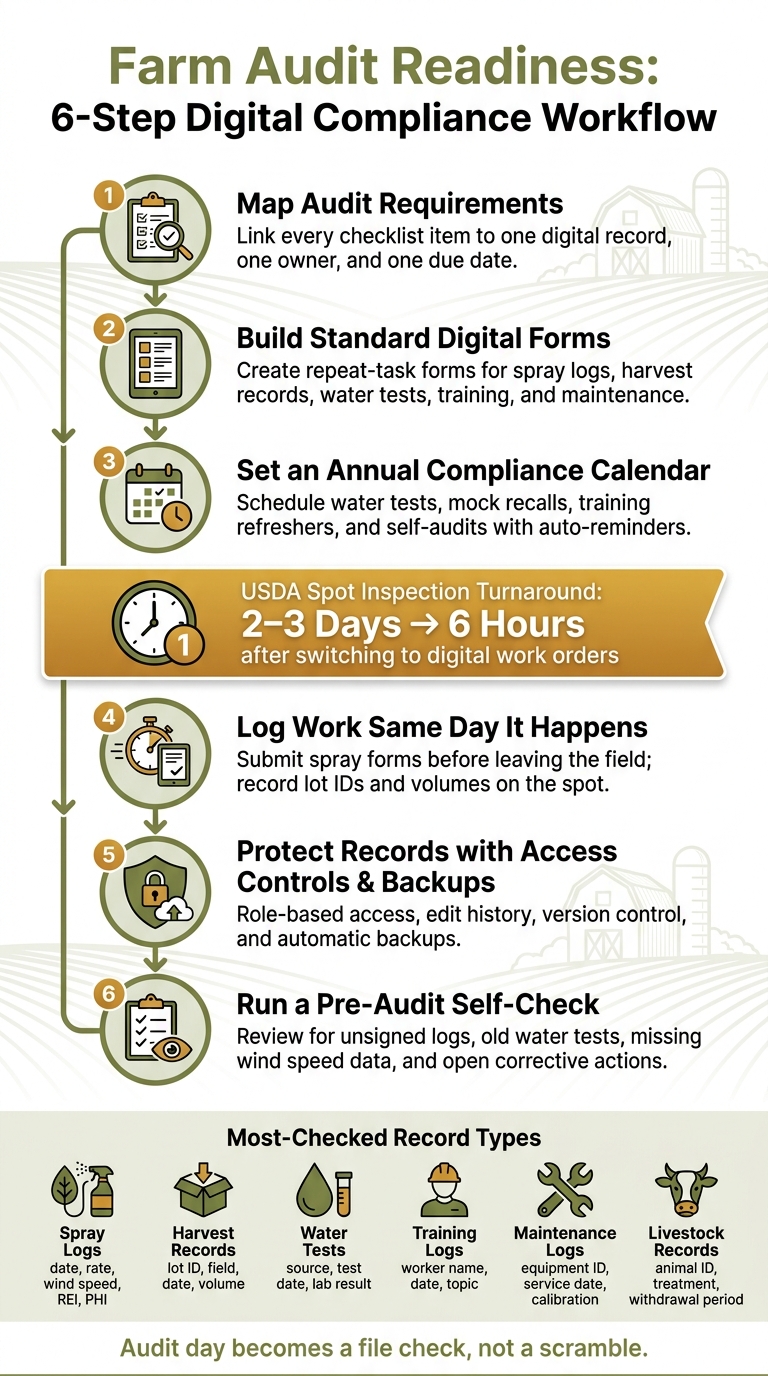
Farm Audit Readiness: 6-Step Digital Compliance Workflow
Match Each Audit Requirement to a Digital Record
Build a Record Map from Your Audit Checklist
Start with the audit checklist and work through it line by line. For each item, ask two plain questions: What digital record shows this requirement is met? And who is supposed to create that record?
That gives you a record map: every audit item, the proof tied to it, and the person who owns it, all in one place. The table below shows how that can look for common U.S. farm audit requirements.
| Audit Requirement | Digital Record Type | Required Data Fields | Responsibility |
|---|---|---|---|
| Pesticide Application | Spray Log | Date/Time, product, rate, wind speed, weather (°F), acres, PHI | Spray Operator |
| Soil Health | Soil Amendment Record | Soil analysis link, fertilizer type, application rate | Agronomist / Manager |
| Food Safety | Sanitation/Hygiene Log | Handwashing station check, restroom cleaning, sign-off | Field Supervisor |
| Traceability | Harvest Record | Lot ID, harvest date, field name, pre-harvest interval check | Harvest Lead |
| Water Quality | Water Test Report | Source ID, test date, lab results (PDF upload), microbial count | Farm Manager |
| Equipment Safety | Maintenance Log | Machine ID, service date, calibration settings, photos | Mechanic |
| Worker Training | Training Record | Employee name, training topic, date, e-signature | HR/Safety Officer |
| Corrective Actions | Issue Tracker | Non-conformance detail, owner, due date, closure photo | Quality Lead |
The goal is simple: one item, one form, one owner, one due date. When each audit point has a clear owner, it gets much easier to standardize the forms that collect the proof.
Create Standard Digital Forms for Repeat Tasks
Next, set up standard digital forms for repeat work like spraying, fertilizer runs, water testing, harvest handling, cleaning, and training. This saves time, but more than that, it cuts down on missing fields and messy records.
Use U.S. units from the start:
- Acres
- Gallons
- Pounds
- °F
- MM/DD/YYYY dates
For spray jobs, auto-capture wind speed and temperature whenever possible. Those details matter for compliance. It’s the kind of thing people mean to write down and sometimes miss when the day gets busy.
Compliance needs to be part of season planning from day one, not something patched together later.
Once the forms are set, move each repeat task onto the compliance calendar.
Build an Annual Audit Calendar with Clear Deadlines
Build an annual compliance calendar that puts every repeat obligation on the schedule with a hard deadline and a named owner. That includes annual water tests, mock recalls, worker training refreshers, equipment checks, and at least one internal self-audit before the official visit.
Set automatic reminders so the right person gets a heads-up before a due date passes, not after. And if a deadline gets missed, the system should kick that issue up to management on its own. That way, problems don’t sit quietly in the background until audit week.
Use the calendar to keep records current well before audit day.
Once the calendar is set up, the next move is logging work in real time.
Transform Your Agricultural Team
Streamline job management, field mapping, and machine tracking with HarvestYield. Simplify your operations and eliminate paper job sheets.
ContinueSimplifying Fresh Produce Compliance Through Digital Documentation
Build Daily Recordkeeping Habits That Keep You Audit-Ready
Once your audit calendar is set, the next move is simple: log records the same day the work happens.
Log Work as It Happens Instead of Recreating It Later
The most common mistake is waiting until the end of the day or week to enter records. That sounds harmless, but details disappear fast. Same-day entry turns work in the field into audit evidence right away, without a messy cleanup later.
When a spray job is done, the applicator should submit the form before leaving the field. When a harvest crew finishes a field, they should record the lot ID and volume on the spot. This cuts down on transcription mistakes and helps avoid backdated entries turning into a compliance problem. Same-day entry can also cut USDA inspection turnaround from days to hours.
To keep records uniform across crews, use the same field names and lot IDs on every form. A weekly review helps catch missing signatures before they turn into audit gaps. Each entry should also match the form and owner listed in your record map.
Capture More Detail in High-Risk Records
Auditors usually check these records first, so they need the most complete information. Chemical applications, livestock treatments, water records, and sanitation logs all need the right fields on your digital forms.
For spray and fertilizer applications, record:
- Product
- Rate
- Target
- Applicator
- Equipment
- Weather data, including wind speed and direction
- Re-entry interval (REI)
Wind speed is one of the most often missing data points in audits, so auto-capture it when your tools support that.
For livestock treatments, each entry should include the animal ID, product used, dose, withdrawal period, and the handler who gave the treatment. For water records, log the source, test date, results, and any corrective actions if needed. For sanitation records, note the cleaning date, equipment ID, sanitizer used, and staff signature.
The more complete the record is, the less time you spend explaining it on audit day.
Protect Records with Access Controls and Backups
Access controls help protect record integrity by splitting up entry, review, and edits. Role-based access keeps those jobs separate: field crews submit their own forms, managers review and approve them, and only approved users can make corrections. Every edit should leave a visible trail.
You should pair that setup with version control and unchangeable activity logs, so you can see what a record looked like before any change was made.
The table below shows a simple schedule that keeps records current without dumping too much work on one person:
| Frequency | Task | Responsible Role | Audit Purpose |
|---|---|---|---|
| Daily | Log spray/fertilizer apps (rate, weather, wind) | Field Crew / Applicator | Chemical compliance & IPM |
| Daily | Record harvest volumes and Lot/Batch IDs | Harvest Crew | Traceability & food safety |
| Weekly | Review digital logs for missing data/signatures | Farm Manager | Data integrity & verification |
| Weekly | Equipment pre-start & safety checks | Operators | Safety & maintenance logs |
| Monthly | Inventory reconciliation (chemicals/fuel) | Manager / Admin | Financial & environmental audit |
| Monthly | Review soil/water test results against plans | Agronomist / Manager | Nutrient management compliance |
Consistent daily logging keeps records ready, so nobody has to scramble at the last minute.
A job-management workflow can pull those logs, maps, and field notes into one place.
Use HarvestYield to Organize Audit Evidence in One Workflow
HarvestYield links each job record to a field, crew member, and date, so your audit evidence stays in one workflow. Once you set up your record map and daily forms, the platform turns those inputs into a searchable audit file.
Set Up Fields, Teams, and Job Types Around Compliance Tasks
Start with the record map from the previous section. Map your fields in HarvestYield and assign each team member to the right role. Then create recurring job types for repeat compliance tasks, so every completed job leaves the same kind of digital trail tied to the right field, the right person, and the right date.
Those forms help keep the audit trail consistent across crews and across seasons. In plain terms, each completed job stays connected to the compliance record it belongs to.
Use GPS, Weather Data, and Field Maps as Audit Support
Each job recorded in HarvestYield can include GPS location and weather data, including wind speed and direction, for spray records, traceability, and boundary checks. That information becomes part of the job record automatically.
Field mapping and measurement tools help define production blocks and treated acres with clear boundaries for audit review. If an auditor asks where work happened and when, those details make the answer much easier to show.
Turn Job History into Audit-Ready Documentation
HarvestYield's job history gives you a time-stamped record of completed tasks, including who did them and when. You can search that history and pull it up fast during an audit.
Real-time capture means job records are ready before inspectors arrive. When your paperwork is already in order, on-site review tends to move faster.
The table below maps HarvestYield features to common audit evidence:
| HarvestYield Feature | Audit Evidence Category | Compliance Benefit |
|---|---|---|
| GPS & Field Mapping | Traceability & Location | Proves exactly where an activity occurred; defines production boundaries |
| Weather Integration | Chemical Application | Automatically logs wind speed and direction for spray records |
| Job History | Operational Logs | Provides a time-stamped record of who did what and when |
| Equipment List | Maintenance & Safety | Tracks service intervals and repairs for machinery audits |
| Photo Attachments | Condition Proof | Documents sanitation, crop health, or equipment calibration |
With records organized this way, the pre-audit check becomes a fast review instead of a scramble.
Run a Pre-Audit Check and Handle Audit Day with Confidence
Complete a Digital Self-Audit Before the Official Visit
Before the inspector shows up, review your own records using the record map and daily logs you already built. Check for unsigned logs, old water test results, overdue training records, and any corrective actions from past audits that still aren’t closed.
Give extra attention to the records auditors flag most often: harvest dates, pre-harvest intervals, and wind speed during spray jobs. If any of those entries are missing or only partly filled out, clean them up before the visit.
It also helps to trace one lot or batch from the original field boundary all the way to the shipment record. That simple test can expose a weak link fast. If something is missing in that chain, you’ll catch it now instead of while the auditor is sitting across from you. Check that agronomist recommendations are directly tied to the spray or fertilizer jobs that came after them, since that connection supports Integrated Pest Management compliance.
Prepare Reports, Maps, and Evidence for Audit Day
Once the self-audit is done, pull together the records an auditor is most likely to ask for. Organize them by the last 12 months, then sort by field, lot, or activity. Have a searchable tablet or laptop ready for audit day.
Keep GPS polygon maps ready so you can show the exact boundaries of each production block. Leave your laptop or tablet open to your digital records so you can pull up files on the spot without digging around.
When the files are set up this way, audit day turns into a retrieval exercise instead of a mad scramble.
Conclusion: Key Steps to Pass Audits with Less Stress
Map each requirement to a digital record, capture data where the work happens, keep job records and compliance proof together in one place with HarvestYield, and run a self-audit before the official review.
As Trace AgTech puts it:
"Audit readiness is no longer an event - it is a continuous operational state."
Steady digital recordkeeping is what makes audit day faster, clearer, and far less stressful.
FAQs
How do I start digitizing farm audit records?
You don’t need to digitize everything in one shot. A phased rollout over 30 to 90 days is usually the smarter move, especially if you’re using a platform like HarvestYield to keep data in one place.
Start with the records that matter most day to day:
- Crop logs
- Labor schedules
- Equipment maintenance data
From there, set up the system, map your fields, and have one pilot operator test the digital workflow first. That gives you a chance to spot issues early without turning the whole farm upside down.
Once that first phase is working, you can build toward audit records that are automated, time-stamped, and geo-tagged.
Which records are most likely to cause audit issues?
Audit issues usually come from incomplete, illegible, or missing records, not from direct compliance failures.
The usual trouble spots are pretty simple on paper, but they cause headaches during an audit: missing harvest dates, missing harvest intervals, no weather data tied to chemical or fertilizer applications, and handwritten agronomist recommendations that are tough to match to the work that was done.
Other weak spots show up in:
- equipment calibration records
- soil analysis data
- proof of worker training
HarvestYield can help by putting GPS-tagged job details and weather logs in one place, so your records are easier to review and ready when an audit comes up.
How often should I run a self-audit?
Run self-audits on a regular basis so you can spot problems early and fix them before an outside auditor does. A common best practice is to do a full self-audit 30 days before the official audit, then complete one last review the day before the auditor arrives on-site.
Digital tools like HarvestYield can help you keep your records up to date and track compliance throughout the season, so you're ready when audit day comes.