5 Steps to Set Up Real-Time Equipment Monitoring
Real-time equipment monitoring helps you track machinery performance, reduce downtime, and cut costs. By using sensors, GPS, and telematics, you can access critical data like engine diagnostics, fuel consumption, and location in one place. This eliminates manual inspections and simplifies farm operations. Here’s how to get started:
- Assess Your Equipment: Identify key machinery (tractors, combines, etc.) and decide which metrics (engine hours, idle time, fuel use) to track.
- Choose a Platform: Look for systems with GPS tracking, geofencing, predictive maintenance, and rural connectivity support.
- Install Hardware: Use compatible trackers and sensors for powered and non-powered equipment, ensuring proper installation for durability.
- Set Up the System: Configure settings, link devices, and create alerts for maintenance and security.
- Use Data for Decisions: Monitor dashboards for insights on fuel efficiency, idle time, and maintenance scheduling to improve operations.
Platforms like HarvestYield make it easier by combining tracking, cost analysis, and job scheduling in one app. Start small, test the system, and expand as you see results.
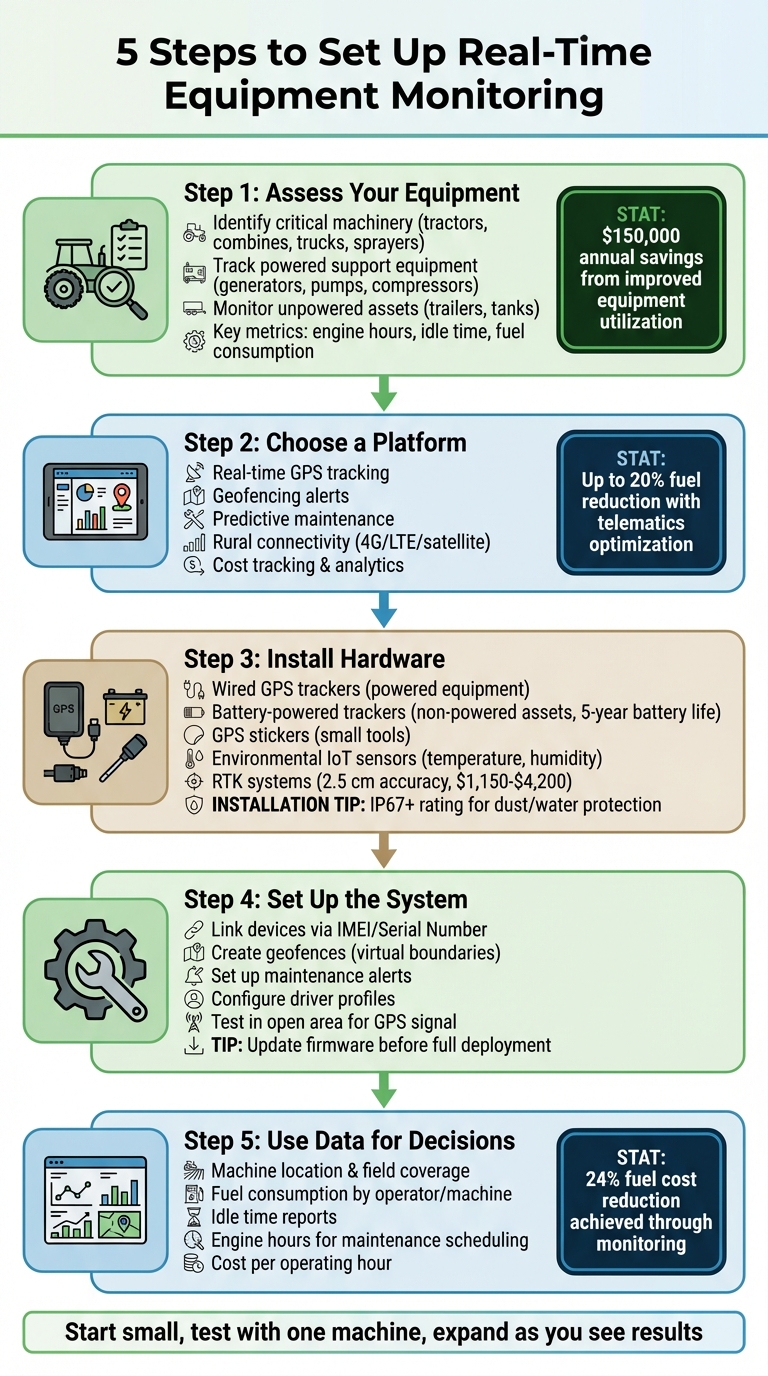
5-Step Process for Setting Up Real-Time Equipment Monitoring
Step 1: Assess Your Equipment and Monitoring Needs
Identify Your Most Important Equipment
Start by focusing on the machinery that’s crucial to your daily operations. High-value assets like tractors, combines, trucks, and sprayers should take priority - they’re not only expensive to replace but also vital to keeping your farm productive. When these machines fail, the financial impact can be significant.
Don’t overlook powered support equipment such as generators, pumps, and compressors. These often provide valuable usage and maintenance data. For unpowered assets like trailers, water tanks, and fuel tanks, attaching low-cost GPS trackers can help prevent theft and make locating them straightforward. In fact, some organizations have reported annual savings of $150,000 just by improving equipment utilization through effective monitoring.
Smaller tools like toolboxes, lawn mowers, and chainsaws can also cause delays if misplaced. Using tracking tags on these items can help keep schedules on track.
Once you’ve identified your key assets, the next step is to figure out which performance metrics will provide the most valuable insights.
Choose Which Metrics to Track
Focus on metrics that influence your operational efficiency and profitability. For instance, tracking engine hours helps ensure timely maintenance, while monitoring idle time can reveal inefficiencies that waste fuel. Measuring fuel consumption by task can highlight underperforming equipment.
GPS data and geofencing alerts are excellent tools for preventing theft and unauthorized use. During harvest, monitoring mass flow and moisture sensor data on combines is crucial - just a 1% error in moisture readings could lead to a yield estimate off by 2.5 bushels per acre.
Lastly, keep an eye on cost-per-operating-hour. This metric helps you weigh the value of repairs versus replacements, ensuring you make informed decisions.
Step 2: Select a Monitoring Platform
Required Platform Features
When choosing a monitoring platform for your farm, it’s important to focus on tools that enhance your daily operations. One key feature is real-time GPS tracking, which lets you monitor the exact location of tractors and harvesters while confirming field coverage as it happens. Another essential capability is geofencing, which sends alerts if equipment crosses preset boundaries - helping you safeguard against theft or unauthorized use.
Predictive maintenance tools are also a must. These features monitor engine diagnostics, fuel consumption, and operational hours, helping you avoid expensive equipment breakdowns. For example, telematics systems can cut fuel usage by up to 20% by optimizing routes and tracking efficiency. Additionally, platforms with cost tracking features give you insights into fuel efficiency, idle times, and overall machine usage - allowing you to address inefficiencies before they hurt your bottom line.
Connectivity is another critical factor. Select a platform that works well in rural areas by supporting networks like 4G, LTE, or satellite. Look for systems with data caching, which temporarily stores data during connectivity outages and uploads it once the connection is restored. If your farm must comply with food safety regulations, such as the FDA FSMA Rule 204, make sure the platform can generate automated digital trails and environmental reports within a 24-hour timeframe.
These features are the backbone of platforms like HarvestYield, which combine real-time monitoring with operational management tools.
How HarvestYield Supports Farm Operations
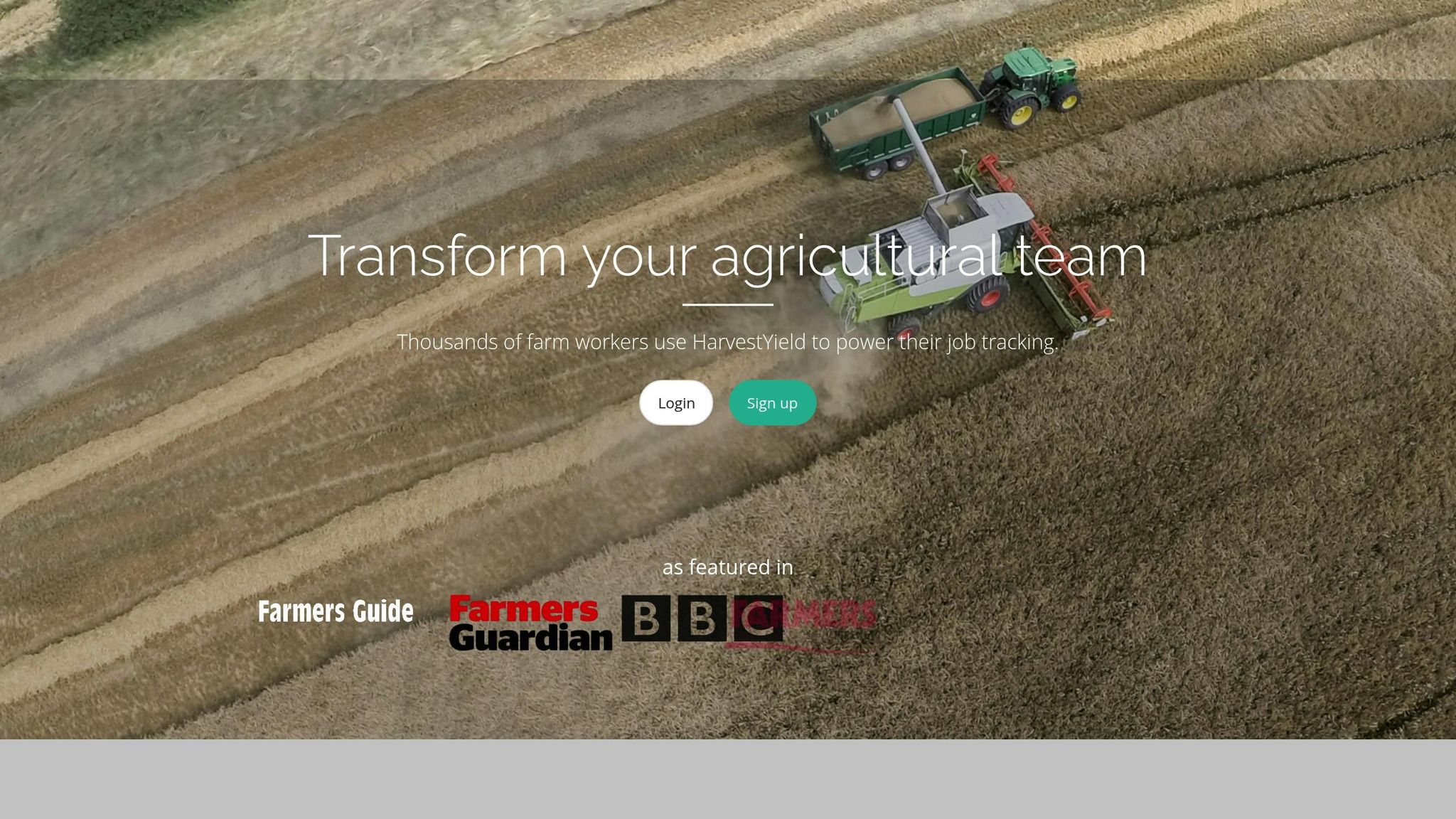
HarvestYield simplifies farm equipment monitoring by using smartphone GPS to track your machinery in real time. As operators move through fields, their routes are displayed as red lines on a map, giving you instant visibility into equipment location and field coverage. This eliminates the uncertainty of where your machinery is and ensures no area is overlooked.
Beyond GPS tracking, HarvestYield integrates key functions like cost monitoring and job scheduling. Before the season starts, you can preload field names, client details, and machine profiles, cutting down on setup time in the cab and reducing the chances of data entry errors during busy fieldwork. Operators automatically receive job sheets, and all work history is stored in one centralized system, making it easy to analyze equipment performance and operator productivity over time.
HarvestYield is available on iOS, Android, and web platforms, ensuring your team has access to up-to-date information whether they’re in the field or at the office. By replacing paper job sheets with digital records - including GPS data and automatic weather updates - the platform gives you a complete view of each job without the hassle of manual documentation.
How to monitor your farm
Step 3: Install Monitoring Hardware
With your platform chosen, the next step is to outfit your machinery with the right hardware to collect real-time data effectively.
Choose the Right Hardware
The hardware you’ll need depends on what you’re monitoring. For heavy machinery like tractors or combines, wired GPS trackers are a great fit. These devices connect to the machine’s power source, enabling them to track engine hours, ignition status, and real-time location. On the other hand, battery-powered or magnetic trackers are better suited for non-powered equipment like trailers, balers, or generators. Some of these trackers can last up to five years before needing a battery replacement.
For smaller assets, GPS stickers offer a compact solution. These adhesive-backed devices work well for items like irrigation pumps or hand tools that can’t accommodate larger trackers. If you’re transporting perishable goods, environmental IoT sensors can monitor critical factors like temperature, humidity, and shock to reduce spoilage - an issue that leads to about 14% of food being lost between harvest and retail due to poor temperature control. For high-precision tasks like planting, RTK (Real-Time Kinematic) systems provide accuracy down to 2.5 cm. Models such as the SMAJAYU JY100 or JY305 range in price from $1,150 to $4,200.
It’s essential to ensure your hardware is compatible with your equipment. Check power sources and connector types - for instance, some heavy machinery requires specific cables like Caterpillar 9-Pin or 14-Pin connectors for accessing engine diagnostics. Additionally, choose devices with an IP67 rating or higher to ensure protection against dust, rain, and mud, which are common in agricultural settings.
Once you’ve selected the appropriate devices, the next step is to install and calibrate them properly.
Proper Installation Matters
Installing devices correctly is critical to ensure they work efficiently and last longer. Start by cleaning the mounting surface to remove dirt or oil, which helps adhesive or magnetic mounts stick securely. Place devices in hidden but accessible spots, such as under seats or inside engine compartments, to deter tampering. Use zip ties, screws, or brackets to keep devices firmly in place, especially during operations that generate heavy vibrations.
Signal strength is another key consideration. Make sure the antenna, whether internal or external, has a clear view of the sky. Avoid placing it in enclosed metal spaces that might block satellite signals. To check functionality, test GPS receivers in open areas to confirm strong signal reception. If you’re working in areas with weak coverage, consider installing high-gain antennas to enhance connectivity.
Take care when routing cables. Keep them away from abrasive surfaces to prevent wear and secure them with zip ties to reduce tension. Regularly inspect the wiring for damage, especially if the equipment has been stored for long periods, as rodents can cause issues. For sensors like moisture monitors, clean debris from the sensing plates to maintain accurate readings.
Finally, opt for devices with data buffering capabilities. These ensure that tracking continues during short connectivity outages and that stored data is uploaded once the connection is restored.
Transform Your Agricultural Team
Streamline job management, field mapping, and machine tracking with HarvestYield. Simplify your operations and eliminate paper job sheets.
ContinueStep 4: Set Up Your Monitoring System
Once your hardware is installed, the next step is to configure your platform to create a seamless network for monitoring all connected devices.
Configure Platform Settings
After purchasing your hardware, most platforms will send you an automated email with login details or a registration link. Use this email to set up and confirm your account. Once that's done, link each device using its unique identifier, such as a Machine PIN, Serial Number, or IMEI.
Double-check that the IMEI matches between the hardware and the platform to avoid tracking errors. If you're using a gateway-based system, make sure the gateway is connected to the internet via Ethernet or WiFi before you start adding individual sensors. For the initial synchronization, place the equipment outdoors where it has a clear view of the sky to establish a satellite connection.
Next, adjust your operational settings. Assign names to each piece of equipment, set up driver profiles, and preload field or client names to make data categorization easier. Use the platform's map to create geofences - virtual boundaries that trigger alerts if equipment exits a designated area or operates outside of set hours. You can also configure notifications for specific events, such as excessive idling, maintenance reminders, or unauthorized movement. Before rolling out the system fully, check the manufacturer's website for any firmware updates.
The final step in this phase is to test the system to ensure everything is functioning properly.
Test and Fix Issues
Start testing by moving your equipment to an open area and confirming that the GPS data displays correctly. Ensure all sensors are recognized by the platform and are reporting accurate data.
If you encounter connectivity issues, make sure the antennas have a clear view of the sky and that all cables are securely connected. For gateway-based systems, using an Ethernet connection instead of WiFi can help avoid signal problems caused by structural barriers.
To test notifications, enable Aggressive Mode and verify that alerts are working as expected. Once testing is complete, switch back to Normal Mode to save battery life. Addressing any issues during setup will save you from dealing with costly service interruptions later on.
Step 5: Track Data and Improve Equipment Use
Read Your Dashboard Data
Your monitoring dashboard acts as your go-to source for real-time insights into equipment performance. From one screen, you can check machine location, fuel levels, engine hours, and maintenance needs. You’ll also see visual path tracking - usually shown as a red line - detailing exactly where your equipment has been.
Keep a close eye on idle time reports, which reveal unnecessary fuel usage and extra wear on engines, as well as utilization metrics that show how often each piece of equipment is active versus sitting idle. Fuel monitoring features let you analyze consumption by machine or operator, making it easier to spot inefficiencies.
HarvestYield’s dashboard takes this a step further, automatically logging GPS data, weather conditions, and job timing. It provides precise details like acreage covered and actual work hours. This eliminates the guesswork when estimating inputs like seed or fertilizer and ensures you can bill accurately for contract work.
These insights are your starting point for smarter decisions.
Use Data to Make Better Decisions
With data flowing from every sensor, you can fine-tune your maintenance and operations. Real-time information changes the game. For example, scheduling maintenance based on engine hours instead of calendar dates helps avoid unnecessary servicing and catches issues early, reducing the risk of breakdowns. Hardy & Harper cut their fuel costs by 24% by tracking equipment usage and health.
Compare fuel consumption and idle times between operators doing similar jobs to identify who might need coaching on efficient equipment use. You can also set up geofences - virtual boundaries around work zones - to get alerts if equipment moves outside a designated area or operates after hours. This feature helps deter theft.
"I can easily say that one Samsara Industrial Gateway has saved us at least three trips to Pennsylvania and several thousand dollars in labor and service costs."
– Ryan Hobson, Director of Controls & Automation, Gryphon Environmental
Remote diagnostics can be a huge money-saver. Gryphon Environmental used remote monitoring to troubleshoot equipment problems without sending a crew to the site, avoiding at least three trips to Pennsylvania and saving thousands in labor and travel costs. This same approach works for farm equipment, cutting down on travel time and expenses while keeping operations running smoothly.
Conclusion
Real-time monitoring unfolds in five key steps: evaluate your equipment and metrics, pick a reliable platform, set up the necessary hardware, configure the system, and start using the data to make smarter decisions. Each step strengthens how you manage machinery and improves team coordination.
The rewards of this approach become clear quickly. You’ll gain instant insights into operations and cash flow while reducing the need for manual paperwork. Monitoring fuel usage and idle time helps identify inefficiencies - some operations have managed to lower fuel costs by as much as 24%. Features like geofencing and GPS tracking also boost security for equipment in remote areas.
HarvestYield combines all these benefits into one platform tailored for agricultural teams. It automatically logs GPS data, weather conditions, and job timing while keeping track of machine costs and scheduling maintenance. Job sheets are sent straight to your team’s phones, cutting out paper trails and keeping everyone on the same page.
By blending real-time data with actionable strategies, your operation is set for growth. Start with one piece of equipment, and as you see results, expand your efforts. The data you gather today lays the groundwork for smarter decisions - whether you’re fine-tuning fuel efficiency, safeguarding assets, or planning future equipment purchases.
Want to simplify your farm operations? Visit HarvestYield and discover how real-time monitoring can transform your equipment management and team collaboration.
FAQs
What are the advantages of using real-time equipment monitoring on farms?
Real-time equipment monitoring gives farm managers a data-backed understanding of their machinery, allowing them to fine-tune operations and eliminate much of the guesswork. By keeping tabs on location, usage, and equipment health as it happens, managers can spot problems early, cut down on manual checks, and handle paperwork more efficiently. This translates to smoother operations and better financial control.
It also plays a key role in security by helping prevent theft and speeding up the recovery of stolen equipment. Utilization reports show exactly how much time machines are actively working versus sitting idle, ensuring farms get the best return on their investment. Plus, using real-time data for proactive maintenance helps reduce unexpected breakdowns, extends the life of equipment, and keeps repair costs in check. Smarter scheduling and fuel management further trim operating costs and improve overall productivity.
In short, real-time monitoring keeps equipment running longer, improves ROI, and helps farms stay agile in today’s fast-paced agricultural world.
How can I determine the best metrics to track for my farm equipment?
To determine the most relevant metrics for your equipment, start by pinpointing your specific objectives - whether it's minimizing downtime, lowering fuel expenses, or increasing efficiency. Think about each machine's main tasks, such as total hours of operation, fuel usage, or distance traveled. Then, zero in on the metrics that tie directly to your goals. For instance, if improving fuel efficiency is your priority, focus on tracking data like gallons used per hour or miles per gallon. Once you've identified these critical metrics, utilize tools like HarvestYield to collect and monitor the data, helping you make smarter decisions to streamline your operations.
What should I look for in a real-time equipment monitoring system?
When selecting a real-time equipment monitoring system for your farm, focus on features that deliver actionable insights into your machinery's location, performance, and expenses. A system with live GPS tracking lets you oversee equipment movement and ensure optimal field coverage. Additionally, tracking key performance metrics - like engine hours, fuel consumption, and temperature - can help you spot potential problems early, reducing the risk of unexpected downtime.
Customizable alerts are another must-have, keeping you informed about critical issues such as overheating or low fuel levels. Systems offering detailed reporting are invaluable for calculating operating costs per hour or acre and managing job-specific details more effectively. For a more streamlined workflow, look for platforms that integrate with other tools, like weather data or soil sensors, so you can consolidate all your farm management insights in one place.