How to Store Farm Data Securely
Farms are producing more data than ever - from GPS-guided tractors to financial records. But with this growth comes risk: cyberattacks on agriculture have surged, with ransomware incidents jumping 118% in late 2024. Shockingly, 80% of farms lack a response plan, leaving critical systems vulnerable.
Here’s how to protect your farm’s data:
- Identify Risks: Catalog all devices (tractors, drones, sensors) and assess vulnerabilities like outdated software or default passwords.
- Strengthen Access: Use strong passwords, enable multi-factor authentication (MFA), and limit data access based on roles.
- Encrypt Data: Protect stored and transmitted data using AES-256 encryption and secure protocols like HTTPS.
- Back Up Data: Follow the 3-2-1 rule: 3 copies, 2 storage types, 1 off-site.
- Secure Networks: Use encrypted Wi-Fi (WPA3), update devices, and segment networks for added safety.
- Train Your Team: Educate employees on phishing, password safety, and reporting suspicious activity.
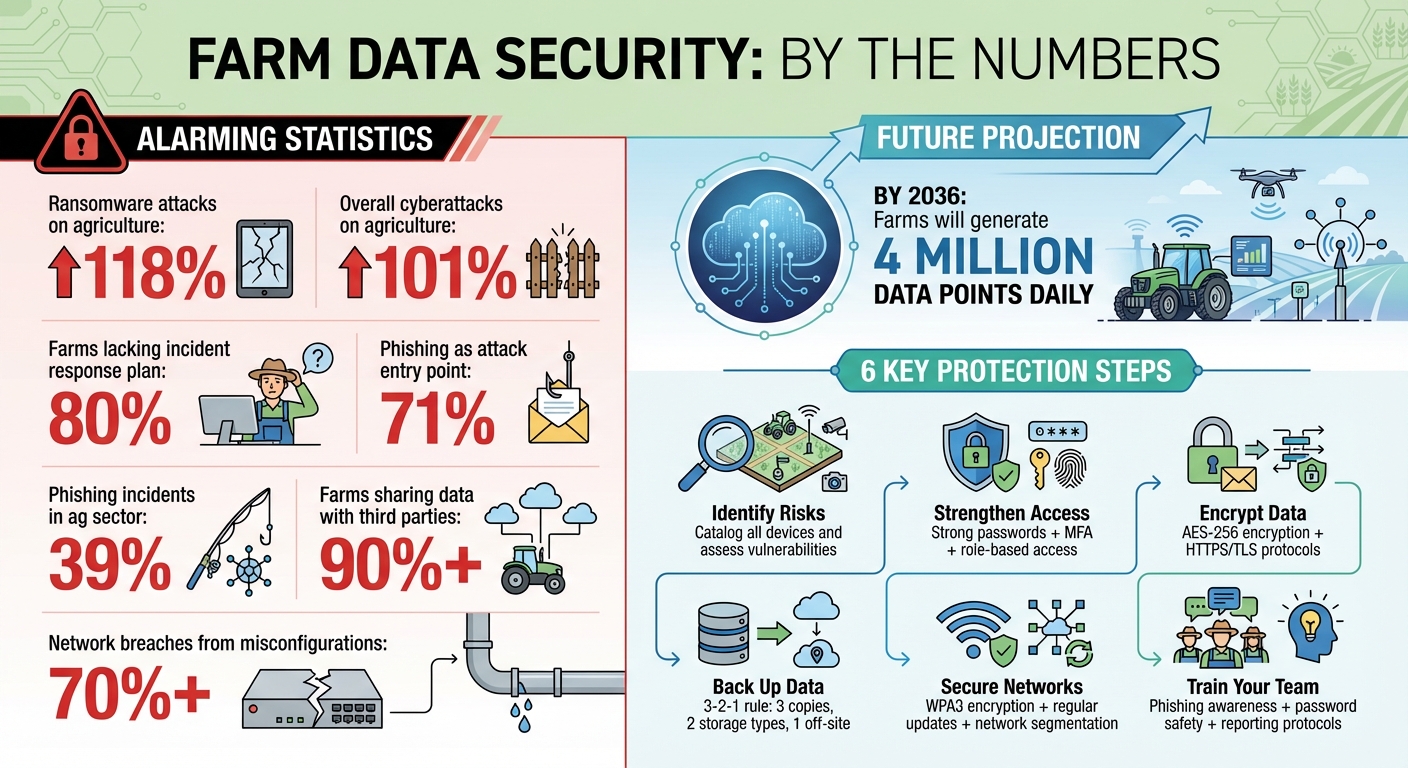
Farm Data Security Statistics and Key Protection Steps
Is Your Farm a Target for Hackers? Real Cybersecurity Risks in Agriculture
Transform Your Agricultural Team
Streamline job management, field mapping, and machine tracking with HarvestYield. Simplify your operations and eliminate paper job sheets.
ContinueAssess Your Farm's Data Security Risks
Protecting your farm's data starts with understanding where your vulnerabilities lie. By identifying your data sources and potential weaknesses, you can take the first steps toward safeguarding your operation.
List All Your Data Sources
Begin by cataloging every device and system on your farm that collects or stores data. This includes GPS-enabled tractors, drones, sensors, weather stations, irrigation controllers, cameras, office computers, and smartphones - essentially anything that generates or holds valuable information.
High-value data, such as proprietary intellectual property (breeding data, unique seed varieties, livestock genetics, or specialized farming methods), is a prime target for theft. Operational technology data - like machinery logs, remote guidance coordinates, and sensor telemetry - could be tampered with to disrupt your operations, potentially leading to crop failure or equipment damage. Additionally, financial and legal records, including land leases and employee information, are often targeted for extortion or fraud. A detailed inventory of these sources is crucial for understanding your risks.
Once you've identified all your data sources, the next step is to assess their vulnerabilities.
Find Potential Security Weaknesses
With your inventory in hand, evaluate each device and system for weaknesses. Pay close attention to IoT devices like smart irrigation systems, automated feeders, and ventilation controllers. Many of these come with factory default passwords, which are easily found online and can provide hackers with a simple way in.
Brad Cave, Bank President at Northwest Bank, explains: "The most successful farmers today aren't just experts in crops and livestock; they are also taking steps to protect their business from modern online threats".
Outdated firmware and software are another area of concern. Systems that haven’t been updated are vulnerable to attacks, especially those using "Living-Off-the-Land" techniques, where attackers exploit the system's own tools to stay under the radar. Check your Wi-Fi network security as well - poorly encrypted or unsecured networks can expose critical data like financial records or crop maps.
Don't overlook third-party access to your systems. Over 90% of forward-thinking farmers share data with external entities, but not all of these arrangements include robust security measures. Physical vulnerabilities also matter. Relying on paper records or storing backups on a single USB drive or external hard drive leaves you exposed to risks like fire, flood, or theft.
Run a Simple Risk Audit
After identifying vulnerabilities, conduct a risk audit to prioritize which issues need immediate attention. Start by reviewing your authentication methods. Ensure sensitive data is protected with multi-factor authentication rather than just basic passwords.
Check your backup procedures. Confirm that backups are automatic, frequent, and include at least one copy stored off-site or in a secure cloud environment. Review your contracts with vendors to clarify data ownership and how your data will be handled after the contract ends. Implement the principle of least privilege, ensuring employees and contractors only have access to the data they need. Document all vulnerabilities and rank them based on their potential impact. For example, a compromised irrigation system during a key growth phase could devastate your crops, while a breach of historical yield data might have less immediate effects.
With 71% of cyberattacks in agriculture starting with phishing and 80% of farms lacking an incident response plan, a thorough risk audit is your first defense. Once you understand your vulnerabilities, you can take targeted steps to strengthen your farm's security.
Set Up Strong Data Access Controls
Protecting your farm's data starts with controlling who can access it. This isn't just about stopping external hackers - it’s also about preventing accidental mistakes from within. This is a key benefit of transitioning to a paperless farm, where digital trails replace messy physical logs. The first step? Secure access with strong password practices and multi-factor authentication (MFA).
Create Strong Passwords and Enable MFA
Factory-set passwords on smart devices and connected systems are a hacker's dream. These defaults are often easy to find online, making your systems vulnerable. Replace them immediately with strong passwords that combine uppercase and lowercase letters, numbers, and symbols.
But passwords alone aren’t enough. MFA adds an extra layer of protection by requiring a second form of verification, like a code sent to your phone or a fingerprint scan. With cyberattacks on agriculture soaring by 101% in just a year, MFA isn’t optional - it’s a must. Make it mandatory for all cloud-based apps, financial systems, and remote access tools.
Not all MFA methods are created equal. For instance, SMS-based codes can fall victim to SIM-swapping, where criminals hijack your phone number. For sensitive accounts, consider using more secure options like hardware security keys or device-specific passkeys that are phishing-resistant.
Assign Role-Based Access Permissions
Not everyone on your team needs access to everything. Role-Based Access Control (RBAC) ensures each person can only see and modify data relevant to their job. Create access tiers, such as:
- Full Access: Reserved for owners and managers.
- Mid Access: For team leaders who need broader but not full system access.
- Limited Access: For seasonal workers or temporary staff.
"Your system should show each person what matters to their role - nothing more, nothing less."
– Ram K. Savana, Founder and Director, Enable Ag
For sensitive data, like financial records or digital record keeping for compliance, restrict access to only the most trusted roles. Use "view-only" settings for information like schedules or safety notes, so your team stays informed without risking accidental changes. Regularly review and update permissions - at least quarterly - to remove users who’ve left and adjust roles as needed.
Comparison: Passwords vs. MFA vs. Biometrics
Here’s a quick look at how these authentication methods stack up:
| Authentication Method | Benefits | Drawbacks | Ease of Implementation |
|---|---|---|---|
| Passwords | Easy to use; no extra hardware needed. | Susceptible to phishing, reuse, and brute-force attacks. | High (Easy) |
| Multi-Factor (MFA) | Adds a strong security layer; blocks most unauthorized access. | Requires a second device and stable connectivity. | Medium |
| Biometrics | Hard to replicate; quick and user-friendly. | Needs specific hardware and may raise privacy concerns. | Medium/Low |
With ransomware attacks on the food and agriculture sector jumping 118% in late 2024 compared to the previous year, robust access controls are essential. By layering strong passwords, MFA, and role-specific permissions, you create a security system that’s much harder to breach.
Encrypt and Back Up Your Data
Once you've set up strong access controls, the next step is safeguarding your farm data through encryption and regular backups. This is more important than ever, with cyberattacks on agriculture surging by 71% year-over-year. Protecting your data, whether it's stored on devices or being transmitted, is a must.
Use Encryption for Stored and Transmitted Data
Encryption works by converting your data into unreadable code, making it accessible only to authorized users. Think of it as locking your data in a digital vault. For stored data - whether on hard drives, devices, or cloud servers - AES-256 encryption is the top standard. For data being transmitted, like when syncing job records or uploading field maps, secure protocols such as HTTPS or TLS are essential.
"Encryption alone does not stop hackers from accessing data, but it makes the data unreadable and useless to them." - SDSU Extension
Encryption comes in two forms: symmetric and asymmetric. Symmetric encryption (like AES-256) uses a single key, offering speed and efficiency. Asymmetric encryption, on the other hand, employs a public/private key pair for added security. For most farm operations, symmetric encryption strikes the right balance between speed and security. Additionally, some systems incorporate digital signatures to ensure data integrity during transmission - so your soil sensor readings, for instance, remain untampered.
After encrypting your data, the next step is implementing a secure backup system.
Select Secure Cloud Backup Solutions
Cloud-based farm management is a smart choice for automated backups and disaster recovery. Top providers rely on enterprise-grade infrastructure that adheres to standards like ISO 27001 and SOC 2. These systems can achieve a Recovery Time Objective (RTO) of under five minutes, meaning you can get back to work almost immediately after an outage.
When choosing a cloud service, confirm it uses AES-256 encryption for stored data and secure protocols for data in transit. Services like HarvestYield provide automatic backups for critical farm data, including GPS coordinates, weather reports, and job records. This automation reduces manual errors and ensures your team can access updated records from any internet-connected device.
For added protection, follow the 3-2-1 rule: keep three copies of your data, use two different storage types, and store one copy off-site in the cloud. Separating raw and processed data is another layer of protection, helping to prevent data corruption.
The table below compares common backup methods:
Comparison: Different Backup Methods
| Feature | Local Backup (USB/Hard Drive) | Cloud-Based Backup | Hybrid Backup |
|---|---|---|---|
| Security | High physical control; vulnerable to fire/theft | Military-grade encryption (AES-256) | Combines local control with cloud redundancy |
| Frequency | Manual; often irregular | Automatic; daily or real-time | Automatic sync when internet is available |
| Recovery Speed | Fast (if hardware is intact) | Sub-5 minute RTO with services | Instant local access; cloud recovery for disasters |
| Internet Need | None | Constant and reliable | Only needed for syncing |
| Disaster Risk | Vulnerable to fire, flood, or pests | Disaster-proof with geographic redundancy | Protected via off-site cloud copy |
Hybrid backups are a great option, combining the speed of local access with the added security of cloud storage. This is particularly useful for farms with spotty internet, as data can be stored locally and synced to the cloud once a connection is available. No matter which method you choose, it's essential to regularly test your recovery process to ensure your backups are functional and reliable when needed.
Protect Your Farm's Networks and Devices
Once you've implemented strong access controls and encryption, the next step is safeguarding the networks and devices that keep your farm running. By 2036, farms are expected to generate a staggering 4 million data points daily. At the same time, cyberattacks on the agricultural sector have surged by 101% in just one year, making network security a top priority.
Configure Encrypted Wi-Fi Networks
Start by creating a dedicated, encrypted Wi-Fi network specifically for your farm's operations. This setup ensures that IoT sensors, smart irrigation systems, and GPS-driven machinery are isolated from personal devices like family tablets or guest phones. Opt for WPA3 encryption - currently the most secure standard - to protect individual data and guard against offline password-guessing attempts. It's worth noting that over 70% of network breaches stem from misconfigurations.
To further secure your network, change the default SSID (the network name) so it doesn't reveal your router's make or model. Disabling SSID broadcasting can also hide your network from casual scans. Replace all factory-default passwords on routers, smart tractors, and irrigation controllers as soon as possible. Limit Wi-Fi access to authorized devices and segment your network to separate control systems from business systems. Additionally, disable unused ports and remote access settings to reduce potential vulnerabilities.
Once your network is secure, turn your attention to keeping your devices up to date.
Update Devices and Software Regularly
Keeping your devices and software updated is critical. Enable automatic updates on routers, smartphones, and farm management software to quickly patch any known vulnerabilities. If automatic updates aren't an option, set a monthly reminder to manually check for firmware or software updates.
Don't forget about connected equipment like smart irrigation systems, yield monitors, and GPS-guided machinery - they also need timely updates to stay secure. Additionally, physically secure any exposed devices and gateways to prevent unauthorized tampering.
"The most successful farmers today aren't just experts in crops and livestock; they are also taking steps to protect their business from modern online threats."
- Brad Cave, Bank President, Northwest Bank
Use Farm-Specific Platforms Like HarvestYield
Network security is just one piece of the puzzle. The software platforms you use also need to safeguard your data. Tools like HarvestYield provide secure data transmission across devices and automatically back up critical farm information - such as GPS coordinates, weather reports, and job records - to the cloud. HarvestYield also supports Role-Based Access Control (RBAC), which lets you control who can access specific data. For instance, employees can view task-specific details like spray records or livestock weights, while sensitive financial information remains private.
When accessing farm data remotely, always use a trusted VPN with AES-256 encryption. This adds another layer of security to your overall data protection strategy.
Monitor and Maintain Data Security
Setting up strong security measures is just the first step - ongoing monitoring is what keeps your farm data safe. With ransomware attacks on the food and agriculture sector jumping by 118% in the last quarter of 2024 compared to the same period in 2023, and 80% of farms lacking a formal incident response plan, staying vigilant is no longer optional.
Track and Log Data Access
Automating the logging of data access and changes is like installing a digital security camera. These logs track every interaction with sensitive information, whether it's financial records, client details, or GPS data from field operations.
Set up alerts for failed login attempts, access from unfamiliar locations, or unusual file downloads. Systems should also lock accounts automatically after repeated failed login attempts to block brute-force attacks. Tools like HarvestYield’s built-in logging features make it easier to monitor access patterns and catch suspicious activity before it becomes a bigger issue.
Regularly reviewing permissions is another critical step. Following the "principle of least privilege", ensure employees can only access data necessary for their roles. This reduces the risk of compromised credentials causing widespread damage.
By maintaining detailed logs and permissions, you’re better equipped to respond quickly and integrate these insights into regular audits.
Schedule Regular Security Audits
Security audits are your chance to find vulnerabilities before attackers do. Start by ensuring multi-factor authentication is enabled for all accounts and that Role-Based Access Control accurately reflects each team member's current responsibilities.
Test your backup systems regularly. Check how quickly you can restore operations (Recovery Time Objective) and how much data could be lost in a worst-case scenario (Recovery Point Objective).
Don’t forget physical security. Inspect machinery for exposed USB ports that could be used to steal data or install malware. Make sure local backup drives are stored in locked, fireproof safes. Additionally, keep a secure "go bag" at a separate location with master passwords, security keys, and network configurations. This ensures you can recover quickly if your primary systems are compromised.
Once your audit procedures are solid, the next step is equipping your team with the knowledge to protect your data.
Train Your Farm Team on Security Practices
Phishing attacks are a top threat, and human error is still one of the leading causes of farm data breaches. Training your team is one of the most effective ways to strengthen your defenses.
Run annual phishing simulations to help employees identify increasingly sophisticated scams. During training sessions, show examples of fake emails targeting farms and stress the importance of verifying requests before clicking links or sharing login details. For seasonal workers, use visual aids or translated materials to ensure everyone understands the basics of digital safety.
Encourage team members to report suspicious emails or system behavior immediately. Reinforce the importance of strong password management, recognizing fake login pages, and never sharing credentials - even with coworkers. Regular refresher courses are especially important during busy planting or harvest seasons to keep security top of mind.
Conclusion
Data security for agricultural businesses requires constant attention, especially as it directly influences the resilience and profitability of your operation. With cyberattacks on agriculture surging by 101% in just one year and farms projected to generate 4 million data points daily by 2036, the need for robust safeguards has never been more urgent.
After conducting a thorough risk assessment, you can strengthen your defenses with practical steps: identify vulnerabilities, enforce strong access controls, encrypt data both at rest and in transit, maintain multiple backups (including at least one offline), secure your networks, keep devices updated, and consider using tools like HarvestYield tailored for agricultural needs.
Phishing remains a significant threat, responsible for 39% of cyber incidents in the agricultural sector. This makes team training as essential as technical measures. Regular audits, access monitoring, and security drills help ensure everyone stays alert and prepared.
"In the age of smart farming, data security is not optional, it's the backbone of your operation." - AgriERP Expert
FAQs
What should my farm’s incident response plan include?
A farm's incident response plan is like its emergency toolkit for cybersecurity breaches. It should clearly lay out the steps to secure systems and fix any vulnerabilities if something goes wrong. Key actions include isolating affected systems to prevent further damage, contacting authorities when necessary, and keeping stakeholders informed throughout the process.
To protect data, it's essential to rely on regular backups, encryption, and multi-layered security measures. Don’t overlook physical security - this is just as important as digital defenses. Lastly, keep the plan fresh by updating it regularly to tackle new threats and ensure the team is trained to handle incidents effectively.
How do I secure IoT farm devices with limited IT support?
Protecting IoT devices on farms can be tricky, especially when IT resources are limited. These devices often come with vulnerabilities like default passwords or outdated software that attackers can exploit. Here’s how you can strengthen their security:
- Use strong, unique passwords: Replace default passwords with complex ones to reduce unauthorized access risk.
- Keep firmware updated: Regular updates patch security flaws and improve device performance.
- Encrypt data transmissions: Encryption ensures that sensitive data stays protected during transfers.
Beyond these basics, consider physically securing devices to prevent tampering. Another key step is network segmentation, which isolates IoT devices from other systems, limiting the damage in case of a breach. Automated tools can also help by detecting suspicious activity and alerting you to potential threats.
For farms without in-depth IT knowledge, managed security services designed for IoT systems can be a game-changer. These services monitor devices, identify risks, and respond to attacks - no advanced IT expertise required.
How often should I test backups and restore data?
It's a good idea to test your backups and practice restoring data every three to six months. Doing this regularly confirms that your backups are functioning properly and ensures you can recover your farm data if something goes wrong. This routine not only safeguards your data but also guarantees you’ll have access to it during emergencies or unexpected data loss.